dbt Materialization Strategies: A Practical Guide With Examples
Views, tables, ephemeral models, and every incremental strategy dbt supports — what each one actually does under the hood, when to reach for it, and where teams get it wrong.
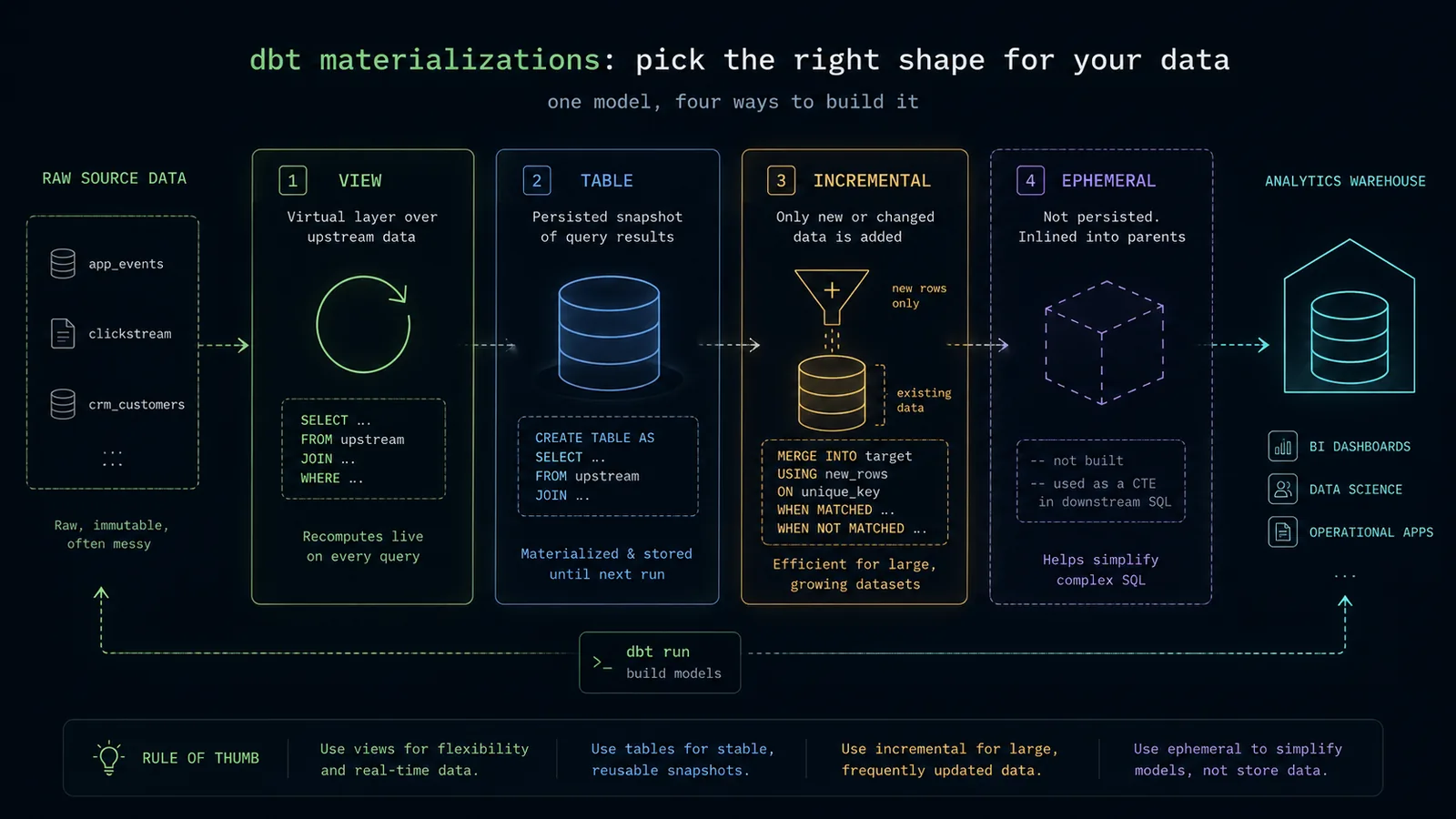
If you've spent any time in a dbt project, you've typed this line more times than you can count:
{{ config(materialized='table') }}And if you're honest, there's a decent chance you picked table — or copied whatever the last model used — without thinking too hard about it. That's fine while you're learning, but materialization strategy is one of the few dbt decisions with a direct, measurable effect on your warehouse bill, your pipeline runtime, and how fresh your data actually is. Get it wrong across a few hundred models and you'll notice: slow dashboards, ballooning compute costs, or a dbt run that used to take 12 minutes and now takes two hours.
This is a practical walkthrough of every materialization strategy dbt supports — what each one actually does under the hood, when to reach for it, and where people get it wrong. We'll cover the four core materializations, every incremental strategy (append, merge, delete+insert, insert_overwrite, microbatch), snapshots for slowly changing dimensions, native materialized views, and a decision framework you can apply to your own project.
What "Materialization" Actually Means in dbt
Every dbt model starts life as a SELECT statement — that's it. dbt doesn't move data around in some proprietary format; it compiles your Jinja-templated SQL into plain SQL and hands it to your warehouse. The materialization is simply the answer to one question: what does dbt do with that SELECT statement when it runs?
- Does it wrap the query in a
CREATE VIEW, so it re-runs live every time someone queries it? - Does it run the query once and persist the results as a physical
CREATE TABLE? - Does it only process the new rows since last run, and merge them into an existing table?
- Does it not create anything in the warehouse at all, and just inline the SQL into whatever references it?
Those four questions map almost exactly onto dbt's four built-in materializations: view, table, incremental, and ephemeral. Every dbt adapter — Snowflake, BigQuery, Databricks, Redshift, Postgres — implements these the same way conceptually, even though the underlying SQL each one generates is warehouse-specific.
config() block, in dbt_project.yml at the folder level, or in a config.yml file — and it can be overridden at any level, with the most specific config winning.View: The Default, and Why That's Deliberate
If you don't specify a materialization, dbt defaults to view. This isn't laziness on dbt Labs' part — it's a genuinely sensible default, and understanding why tells you a lot about how to think about materializations in general.
A view materialization compiles your model into a CREATE VIEW AS SELECT ... statement. No data is copied or stored. Every time a downstream query hits that view, the warehouse re-runs the underlying SELECT against the source tables, live.
{{ config(materialized='view') }}

SELECT
    id AS customer_id,
    first_name,
    last_name,
    email,
    created_at AS customer_created_at
FROM {{ source('raw', 'customers') }}
Why this is the right default: views are free to create and always up to date, because they run against live data on every query. For a staging model that just renames and casts columns from a raw source, there's no benefit to persisting that as a table — you'd just be storing a copy of data you already have.
use it for
- Staging models — thin, 1:1 wrappers around source tables doing renaming, casting, and light cleanup.
- Infrequently queried models, where recomputing live is cheaper than maintaining a physical copy.
- Models on top of already-fast source data, with no performance penalty to computing live.
where it breaks down
Views are only as fast as the query underneath them. Stack five views on top of each other and every downstream query recomputes the entire chain, every time — from raw source to final result. This is one of the most common performance own-goals in dbt projects: staging built entirely of views is fine, but if intermediate and mart layers are also views, dashboard queries that should take two seconds start taking two minutes, because the warehouse is silently re-running your whole DAG on every page load.
Table: Trading Storage for Speed
A table materialization runs your SELECT once per dbt run and persists the full result set as a physical table. dbt builds a new table with a temporary name, then swaps it in atomically once it's built successfully — so a failed run doesn't leave you with a half-built table where your production one used to be.
{{ config(materialized='table') }}

WITH customers AS (
    SELECT * FROM {{ ref('stg_customers') }}
),

orders AS (
    SELECT * FROM {{ ref('stg_orders') }}
),

customer_orders AS (
    SELECT
        customer_id,
        count(*) AS number_of_orders,
        sum(order_total) AS lifetime_value
    FROM orders
    GROUP BY 1
)

SELECT
    c.customer_id,
    c.email,
    coalesce(co.number_of_orders, 0) AS number_of_orders,
    coalesce(co.lifetime_value, 0) AS lifetime_value
FROM customers c
LEFT JOIN customer_orders co USING (customer_id)
Every time you run dbt run, this entire query re-executes from scratch and the whole table is rebuilt. That's the trade-off: you pay the full compute cost of the query on every run, but every query against dim_customers afterward is fast, because it's reading pre-computed data instead of re-joining and re-aggregating live.
use it for
- Mart-layer models that BI tools query directly — paying compute cost once at
dbt runtime beats paying it on every dashboard refresh. - Models with expensive joins or aggregations that would be painfully slow to recompute live.
the trade-off
A full table rebuild means full compute cost, every time, regardless of how much data actually changed. If dim_customers has 50 million rows and you're adding a few thousand orders a day, rebuilding the entire table daily is wasteful — which is exactly the problem incremental solves.
Ephemeral: The Materialization That Isn't
ephemeral is the odd one out — it doesn't create anything in your warehouse at all. dbt takes your model's SQL and inlines it as a CTE directly into whatever model references it, at compile time.
{{ config(materialized='ephemeral') }}

SELECT
    *,
    row_number() OVER (
        PARTITION BY order_item_id
        ORDER BY _loaded_at DESC
    ) AS rn
FROM {{ source('raw', 'order_items') }}
QUALIFY rn = 1
Reference this with {{ ref('stg_order_items__deduped') }} and dbt doesn't query a table or view — because none exists. Instead, at compile time, it rewrites the reference into a CTE inline within the downstream model's compiled SQL.
use it for
- Lightweight logic kept purely for readability — dedup steps, simple filters, a calculation referenced by exactly one or two downstream models.
- Reducing schema clutter — ephemeral models never show up in your warehouse's schema browser or a BI tool's table picker.
where people get burned
You can't query an ephemeral model directly to sanity-check it — there's nothing to query. It's also easy to over-use: if an ephemeral model is referenced by five downstream models, its logic gets duplicated into the compiled SQL five separate times. If it's doing anything non-trivial — a window function, a large scan — that's five times the compute cost instead of one shared table. Keep ephemeral models thin and referenced by only one or two things.
Incremental: Only Processing What's New
This is where materialization strategy stops being a checkbox and starts being an actual design decision — the one that saves the most money and time when done well, and causes the most subtle bugs when done poorly.
An incremental model behaves differently depending on whether the target table already exists. On the first run (or a full-refresh), dbt builds the table from scratch, exactly like a table materialization. On every run after that, dbt only processes new or changed rows and merges, appends, or replaces just that slice into the existing table.
The mechanism is the is_incremental() macro, which evaluates to false on the first/full-refresh run and true after that:
{{
  config(
    materialized='incremental',
    unique_key='event_id'
  )
}}

SELECT
    event_id,
    user_id,
    event_type,
    event_timestamp
FROM {{ source('raw', 'events') }}

{% if is_incremental() %}
  WHERE event_timestamp > (SELECT max(event_timestamp) FROM {{ this }})
{% endif %}
{{ this }} refers to the model's own existing table — so on incremental runs, dbt filters the source down to only rows newer than whatever's already loaded, instead of rescanning everything. If the source table has 2 billion historical rows and 50,000 new rows land daily, this is the difference between scanning 2 billion rows every run versus scanning roughly 50,000.
The unique_key and Why It Matters
Notice unique_key='event_id' above. This tells dbt how to handle rows that already exist in the target table. Without it, dbt just appends every row the incremental query returns — no deduplication. If your source ever re-sends a row (common with CDC feeds and at-least-once delivery), duplicates pile up silently.
With unique_key set, dbt performs a merge (or delete+insert): if an incoming row's key already exists, it updates that row instead of duplicating it. It also accepts a list, for models where uniqueness is a combination of columns:
{{
  config(
    materialized='incremental',
    unique_key=['order_id', 'line_item_id']
  )
}}
Incremental Strategies: Append vs. Merge vs. Delete+Insert vs. Insert Overwrite
is_incremental() and unique_key tell dbt which rows to process. The incremental_strategy config tells dbt how to apply those rows to the existing table — and this is where behavior differs meaningfully by warehouse, so it's worth understanding each one at the record level.
append
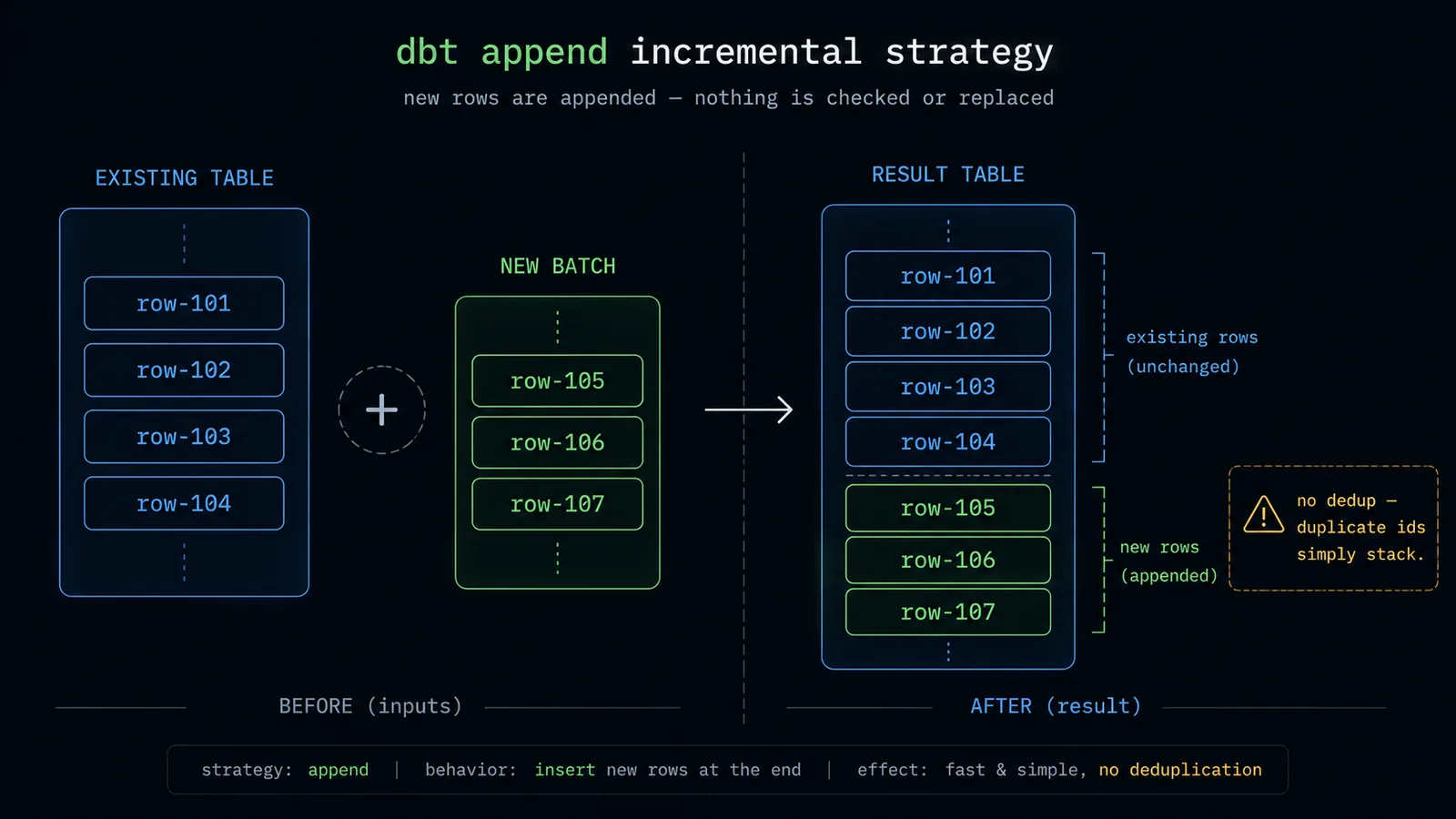
The simplest strategy: new rows are just inserted, nothing is checked or replaced. Fast, but only safe when you can guarantee incoming rows are genuinely new — e.g. an immutable, append-only event log with no unique_key. If duplicates are even remotely possible, don't use this.
{{
  config(
    materialized='incremental',
    incremental_strategy='append'
  )
}}
merge
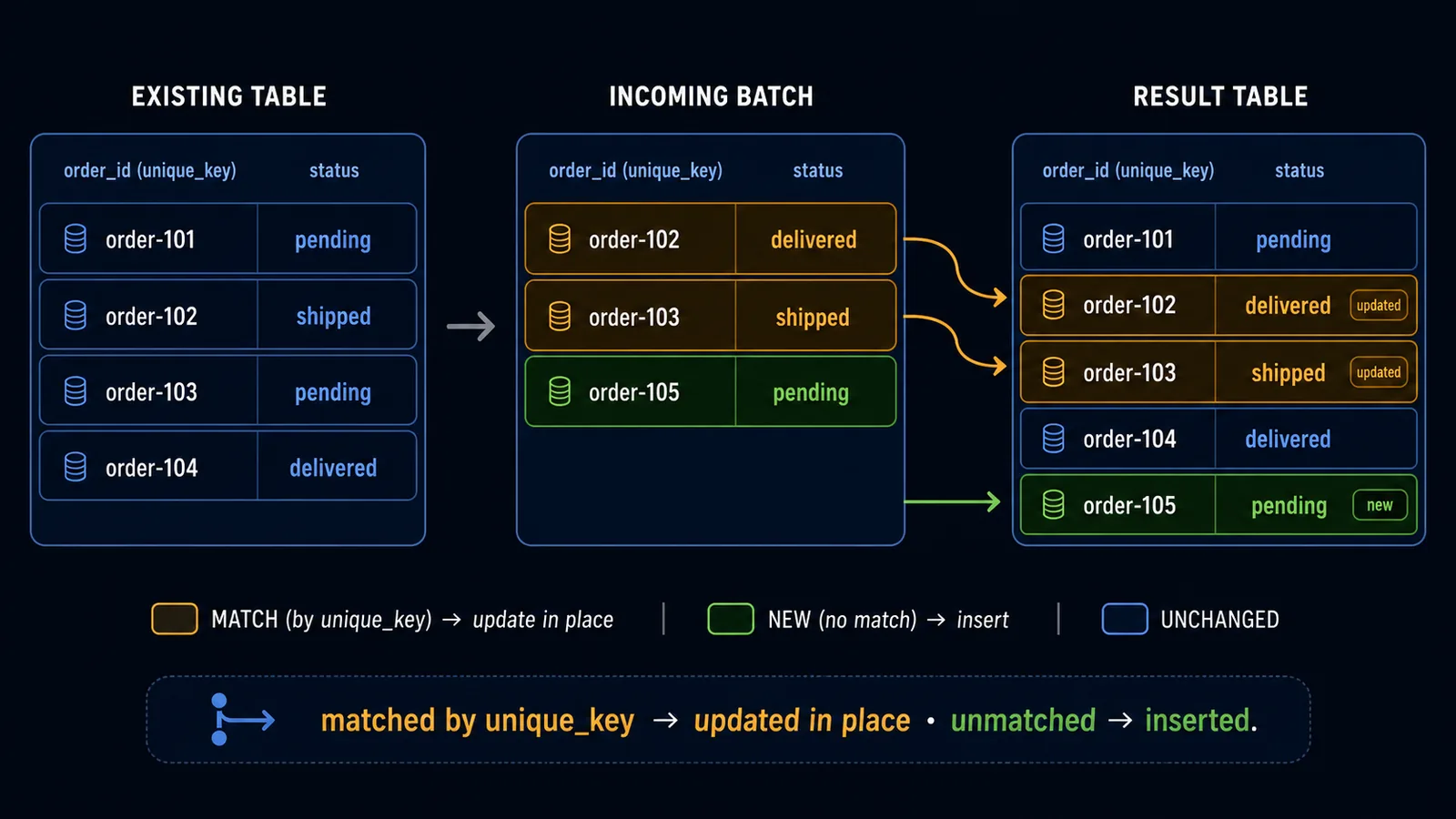
The default (and generally safest) strategy on warehouses with native MERGE support — Snowflake, BigQuery, Databricks, Postgres 15+. Using unique_key, dbt generates a MERGE statement: matching rows get updated, non-matching rows get inserted.
{{
  config(
    materialized='incremental',
    unique_key='order_id',
    incremental_strategy='merge'
  )
}}

SELECT
    order_id,
    order_status,
    order_total,
    updated_at
FROM {{ source('raw', 'orders') }}

{% if is_incremental() %}
  WHERE updated_at > (SELECT max(updated_at) FROM {{ this }})
{% endif %}
This is the right choice for anything mutable — orders that change status, subscriptions that get upgraded, any row that can be legitimately updated after it was first created.
delete+insert
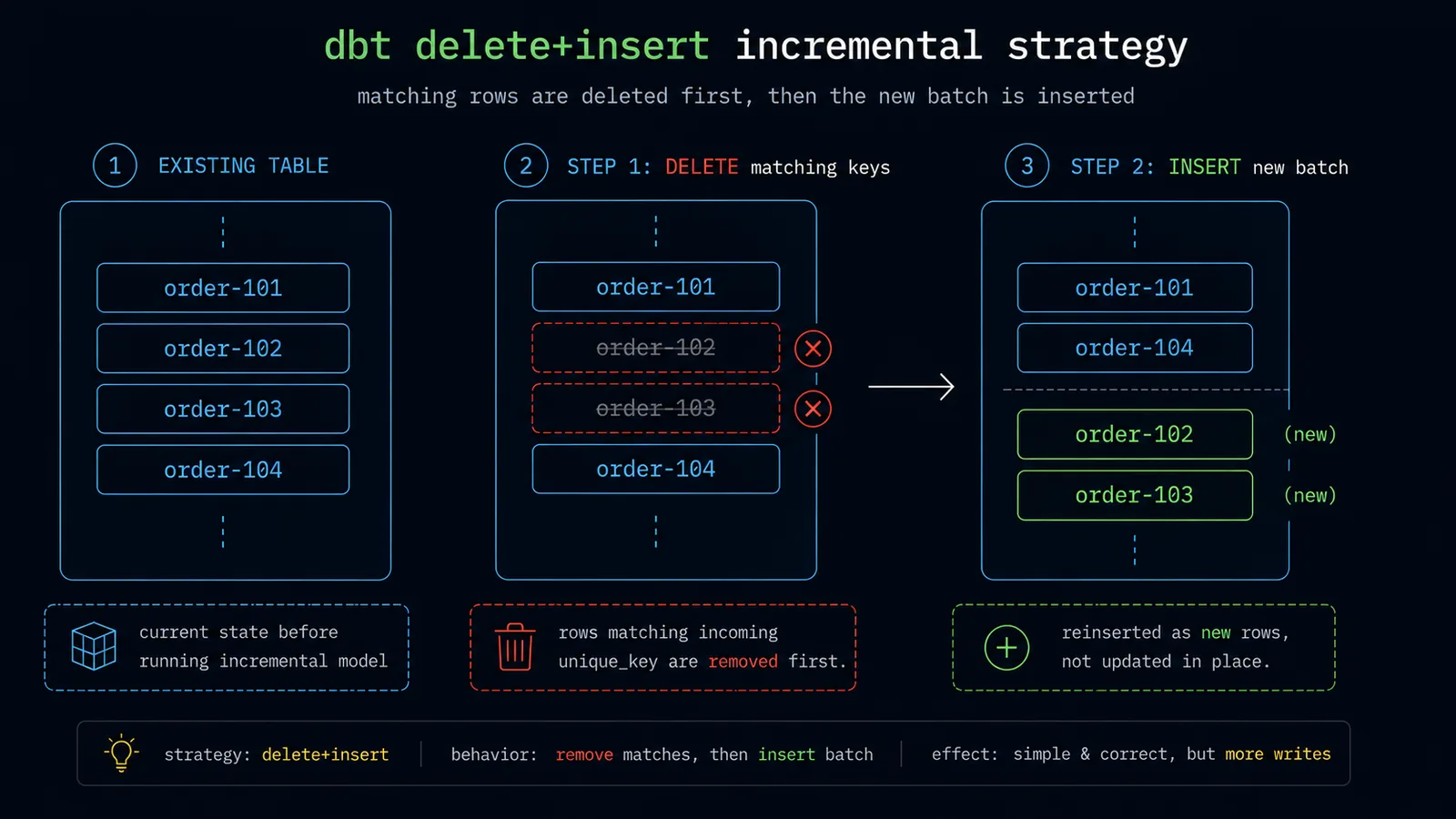
Used mainly on warehouses without native MERGE, or when you specifically want to delete-then-reinsert entire matching keys rather than update columns individually. dbt runs a DELETE against rows matching the unique_key in the incoming batch, then inserts the new batch — functionally similar to merge for most purposes, but as two separate statements instead of one atomic operation.
{{
  config(
    materialized='incremental',
    unique_key='order_id',
    incremental_strategy='delete+insert'
  )
}}
insert_overwrite
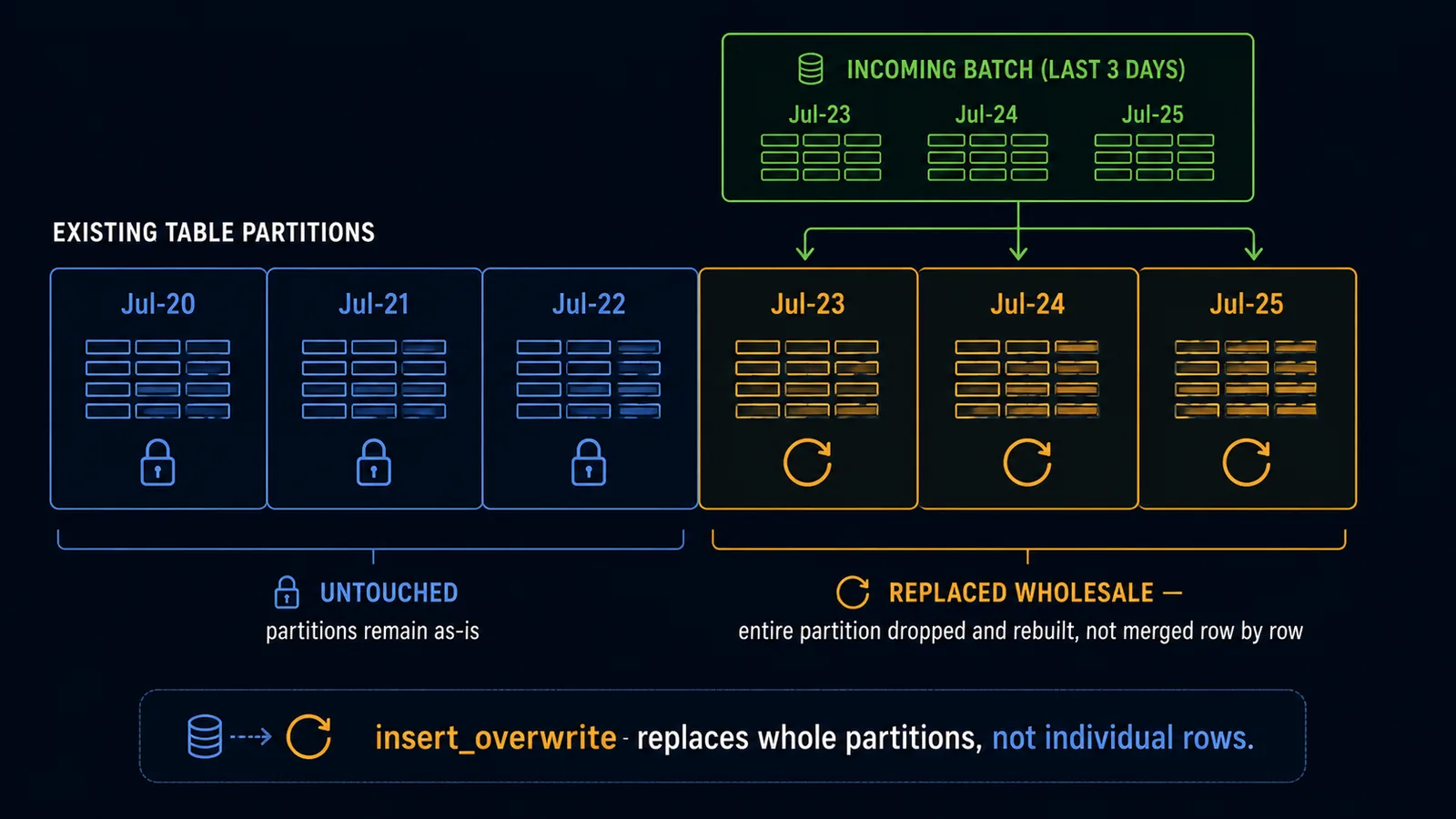
Specific to warehouses with native partition support (BigQuery, Databricks/Spark). Instead of matching on a row-level unique_key, this strategy replaces entire partitions at once — the standard approach when data is naturally partitioned by date and a given partition might get reprocessed wholesale.
{{
  config(
    materialized='incremental',
    incremental_strategy='insert_overwrite',
    partition_by={
      'field': 'activity_date',
      'data_type': 'date'
    }
  )
}}

SELECT
    activity_date,
    user_id,
    count(*) AS events_count
FROM {{ ref('stg_events') }}

{% if is_incremental() %}
  WHERE activity_date >= date_sub(current_date(), INTERVAL 3 DAY)
{% endif %}

GROUP BY 1, 2
Notice the lookback window — 3 days, not strictly "since last run." This is a deliberate pattern: late-arriving data means the most recent partitions are never really "final." Reprocessing the last 3 days on every run, and overwriting those partitions wholesale, keeps things correct without reprocessing your entire history.
microbatch
Introduced in dbt 1.9, and worth calling out separately because it changes the mental model rather than just being another config option. Instead of one query with a manually-written is_incremental() filter, you tell dbt the time column and batch size, and dbt automatically breaks processing into discrete time-based batches, processing — and retrying — each one independently.
{{
  config(
    materialized='incremental',
    incremental_strategy='microbatch',
    event_time='event_timestamp',
    begin='2024-01-01',
    batch_size='day'
  )
}}

SELECT
    event_id,
    user_id,
    event_type,
    event_timestamp
FROM {{ source('raw', 'events') }}
No is_incremental() block needed — dbt handles the filtering itself, running one query per day of data. The advantage shows up at scale and on backfills: reprocessing two years of daily data runs as 730 independent batch queries instead of one enormous query, and if batch #400 fails, you retry just that one batch instead of the whole run — a meaningfully different failure mode than a traditional incremental model, where one bad run can mean re-running everything.
Full Refreshes
Because incremental models only add new logic on top of what's already there, they can drift from what a from-scratch build would produce — a bug in your is_incremental() filter, a schema change upstream, or a historical backfill are all situations where you need to rebuild the whole thing:
dbt run --select fct_events --full-refreshThis drops (or truncates, depending on adapter) the existing table and rebuilds it completely, as if it were the first run. It's worth running full refreshes periodically, or automating one after any change to an incremental model's logic — a model that "runs successfully" incrementally can still be silently wrong if the underlying logic changed but historical rows were never reprocessed.
Snapshots: Tracking History dbt Doesn't Normally Keep
Every materialization so far represents the current state of your data. But sometimes you need history — what a row looked like at some past point, even after it's since changed. That's what dbt snapshots are for: they implement Type 2 Slowly Changing Dimensions, keeping the old version of a row and adding a new one, with validity date ranges marking when each version was current.
Snapshots live in a separate snapshots/ directory, not models/ — but conceptually they're the same idea: a strategy for how dbt persists data.
{% snapshot customers_snapshot %}

{{
    config(
      target_schema='snapshots',
      unique_key='customer_id',
      strategy='timestamp',
      updated_at='updated_at',
    )
}}

SELECT * FROM {{ source('raw', 'customers') }}

{% endsnapshot %}
Running dbt snapshot against this produces a table with dbt_valid_from and dbt_valid_to columns added automatically. If a customer's email changes, the old row's dbt_valid_to is set to the snapshot time, and a new row is inserted with dbt_valid_from set to that same time and dbt_valid_to left null.
Two strategies detect changes: timestamp (shown above) compares an updated_at column, and check compares specific columns row-by-row for any difference — useful when there's no trustworthy updated_at to rely on.
{{
    config(
      target_schema='snapshots',
      unique_key='customer_id',
      strategy='check',
      check_cols=['email', 'address', 'plan_tier'],
    )
}}
Use snapshots anywhere you need to answer "what did this look like on a given date" — a customer's subscription tier at the time they churned, a product's price at the time it was ordered. Without snapshots, once a source row changes, its previous value is gone forever. Snapshots capture history going forward from whenever you start — they can't retroactively recover history you didn't capture.
Materialized Views: Native Incremental Refresh
Recent dbt versions added a materialized_view materialization mapping to your warehouse's native materialized view feature — Snowflake dynamic tables, BigQuery materialized views, Redshift materialized views, Databricks materialized views. This differs meaningfully from dbt's own incremental: the warehouse itself manages incremental refresh internally, often keeping the view continuously up to date without a dbt run triggering it at all.
{{
  config(
    materialized='materialized_view',
  )
}}

SELECT
    order_date,
    sum(order_total) AS daily_revenue
FROM {{ ref('stg_orders') }}
GROUP BY 1
On Snowflake specifically, this compiles to a dynamic table, with its own target_lag controlling how fresh the data stays:
{{
  config(
    materialized='materialized_view',
    snowflake_warehouse='transform_wh',
    target_lag='5 minutes',
  )
}}
Use it for genuinely near-real-time cases where even the shortest reasonable dbt run schedule isn't fresh enough, and where your warehouse's native support is mature enough to trust. This is newer and less universally battle-tested than the classic four materializations — check your adapter's docs before leaning on it heavily. For most teams, a well-tuned incremental model on a tight schedule is still the more portable, more debuggable choice.
Warehouse-Specific Behavior Worth Knowing
Materializations are a dbt abstraction, but what actually happens underneath varies by adapter:
| Warehouse | Notable behavior |
|---|---|
| Snowflake | Native, fast merge; dynamic tables are a genuinely strong materialized-view option. Per-second billing narrows the view-vs-table cost gap for infrequently queried models. |
| BigQuery | First-class insert_overwrite via native partitioning/clustering — often the default recommendation for large, date-partitioned fact tables. Billed by bytes scanned, so poor filtering shows up directly on the bill. |
| Databricks / Spark | Strong insert_overwrite support given Spark's native partition handling; mature materialized views via Delta Live Tables. |
| Redshift | Historically lacked native MERGE, making delete+insert the more common strategy, though newer versions have closed this gap. |
| Postgres | Straightforward and merge-capable on 15+, but lacks BigQuery/Snowflake's automatic partition-pruning — incremental filter logic matters more for actual performance. |
The takeaway isn't "memorize warehouse quirks" — it's that incremental_strategy isn't purely stylistic. Some strategies aren't even available on some adapters, and the ones that are can perform very differently. Check current adapter documentation for your specific warehouse rather than assuming a pattern that worked on Snowflake ports directly to Redshift.
A Decision Framework
A practical way to work through the choice for any given model:
Thin staging model, referenced mostly by other dbt models? → view (or ephemeral if tiny and referenced by only one downstream model).
Queried directly by a dashboard, non-trivial joins/aggregation, but data is small-to-medium and rebuilds are fast? → table.
Large, append-heavy fact table where a full rebuild is slow or expensive? → incremental, with append if duplicates are structurally impossible, otherwise merge.
Data naturally partitions by date, with occasional late-arriving or reprocessed data? → incremental with insert_overwrite and a lookback window.
Processing years of history, or want independently retryable batches? → incremental with microbatch.
Need to know what a row looked like at a past point in time, not just its current value? → a snapshot, alongside whatever materialization the current-state model uses.
Need near-real-time freshness that even hourly runs can't hit, with mature warehouse support? → materialized_view.
Most projects land on: views for staging, tables for most marts, and incremental reserved specifically for the handful of genuinely large fact tables where it earns its complexity. Resist the urge to make everything incremental "for performance" — incremental models are harder to reason about, harder to debug, and easy to get subtly wrong. Reach for incremental when the numbers actually justify it, not by default.
Common Mistakes
A few patterns show up often enough in real dbt projects to call out specifically.
Forgetting unique_key on a merge-eligible incremental model. Without it, dbt just appends everything the query returns. If the source ever re-sends a row — more common than expected with CDC pipelines and retried API calls — you get silent duplicates that inflate every downstream SUM() and COUNT() until someone notices the numbers look wrong.
Chaining views too deep. A staging view referencing a source, an intermediate view referencing that, and a mart view referencing the intermediate means every mart query silently recomputes the entire chain, every time.
Making everything incremental "just in case." Incremental models carry real complexity: periodic full refreshes to catch drift, harder debugging, more config surface area to maintain correctly forever. For a model that rebuilds in 10 seconds as a plain table, none of that is worth it.
Never running full refreshes. An incremental model's correctness assumes logic hasn't drifted from a from-scratch build. Change the WHERE clause or fix a bug, and existing rows built under the old logic don't automatically get corrected — only new incremental runs use the new logic.
Using insert_overwrite without understanding partition boundaries. This replaces entire partitions, not individual rows. If your filter and your partition_by column don't line up cleanly, you can reprocess far more than intended, or miss data just outside your filtered window.
Testing Materialized Models
Materialization strategy and data testing are closely linked, because the failure modes above are exactly what tests catch. A few worth having on any incremental model specifically:
models:
  - name: fct_orders
    columns:
      - name: order_id
        tests:
          - unique
          - not_null
      - name: order_total
        tests:
          - not_null
A unique test on the unique_key column of an incremental model is close to mandatory — it's the test that catches the "forgot unique_key" mistake before it reaches a dashboard. Cheap to run, and it directly validates the thing most likely to silently break.
It's also worth adding a freshness check on the source feeding an incremental model, so a stalled pipeline shows up as a failed test rather than a stakeholder asking why yesterday's numbers look flat:
sources:
  - name: raw
    tables:
      - name: events
        loaded_at_field: _loaded_at
        freshness:
          warn_after: {count: 6, period: hour}
          error_after: {count: 24, period: hour}
Putting It Together: A Realistic Project Layout
Here's how these strategies typically play out across a real dbt project's layers:
models/
├── staging/
│   ├── stg_customers.sql        -- materialized='view'
│   ├── stg_orders.sql           -- materialized='view'
│   └── stg_order_items.sql      -- materialized='view'
├── intermediate/
│   └── int_order_items_deduped.sql   -- materialized='ephemeral'
└── marts/
    ├── dim_customers.sql        -- materialized='table'
    ├── dim_products.sql         -- materialized='table'
    ├── fct_orders.sql           -- materialized='table' (rebuilt daily)
    └── fct_events.sql           -- materialized='incremental', strategy='merge'

snapshots/
└── customers_snapshot.sql       -- SCD Type 2 history of customer records
The logic: staging is cheap and always fresh, so it's views. A single small deduplication step feeds only one downstream model, so it's ephemeral rather than cluttering the schema. The dimension tables are small enough that a daily full rebuild costs almost nothing, so they're plain tables — simple, easy to debug. fct_orders is medium-sized and still cheap enough to fully rebuild daily. fct_events, the actual high-volume event log, is the one model that justifies incremental complexity, with a unique_key and merge strategy to stay correct as source data occasionally gets reprocessed. The customer snapshot runs alongside all of this, independently, preserving history none of the current-state models would otherwise keep.
This is a reasonable default shape for a mid-sized project. The specific numbers — what counts as "small enough to just be a table," what counts as "large enough to justify incremental" — depend entirely on your own data volumes and warehouse cost structure, but the underlying decision process is the same regardless of scale.
Wrapping Up
Materialization strategy in dbt isn't a settings toggle you pick once and forget — it's an ongoing trade-off between compute cost, storage cost, freshness, and complexity, and the right answer differs for almost every model in a real project. Views are close to free but recompute on every query; tables are fast to query but expensive to rebuild in full every time; incremental models are efficient at scale but carry real complexity that needs active management; snapshots and materialized views solve specific problems — historical tracking and near-real-time freshness — that the four core materializations don't address at all.
The practical takeaway: default to view for staging, default to table for most marts, and reserve incremental for the specific handful of models where data volume genuinely justifies the added complexity. Add snapshots only where you actually need historical tracking, and treat materialized views as a warehouse-specific tool for freshness requirements nothing else can hit. Get those defaults right, and the rest of your dbt project's performance and cost profile tends to take care of itself.
— This article is part of an ongoing tooling series on techedge.in. Questions about which materialization fits your model? Drop a comment, I read every one.
One email, every other week.
New posts on data engineering, applied AI, and the business decisions around them. No noise, unsubscribe anytime.
Comments
All comments are reviewed before they appear publicly — this keeps spam out.
Loading comments…