Text-to-SQL Will Cheerfully Give You a Wrong Number (And How to Catch It)
AI can write a SQL query that runs perfectly, returns a plausible number, and is completely wrong — with no error message anywhere. A field guide to the five failure modes, why benchmarks understate them, and how to catch them before they reach a dashboard.
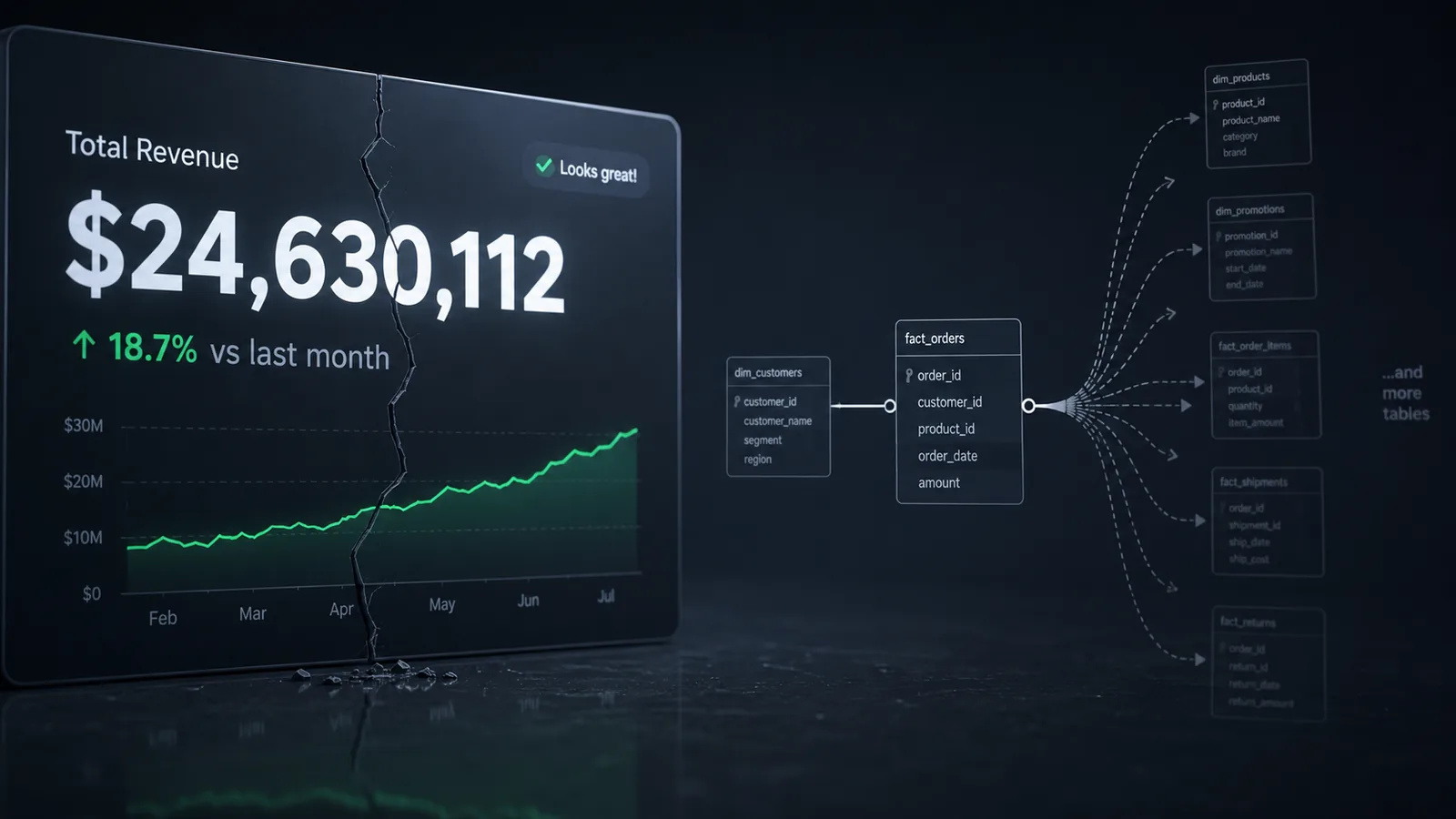
Ask an AI assistant to write you a query, and one of two things happens. Either it fails loudly — a typo, a missing table, a syntax error your editor underlines in red — and you fix it in ten seconds and move on. Or it fails silently: the query runs, it returns a number, the number looks like the kind of number that question should produce, and you ship it. The first kind of failure costs you nothing. The second kind costs you a board meeting where someone asks why revenue was reported 15% higher than it actually was, and nobody can say exactly when that started.
This is a field guide to the second kind of failure — the specific, well-documented ways text-to-SQL gets things wrong while looking completely fine, why the benchmarks the industry uses actually understate how often this happens, and what a genuinely useful review habit looks like once you accept that "it ran without an error" tells you almost nothing.
Why This Matters Right Now
This isn't a hypothetical. Natural-language-to-SQL tools have moved from novelty to daily habit astonishingly fast — analysts, product managers, and founders now routinely ask an AI assistant to "just write the query" rather than opening a SQL editor themselves. That's a genuinely good development in a lot of ways; it lowers the floor for who can ask a question of a database. But it also means a specific, well-studied class of error is quietly showing up in more dashboards, more reports, and more decisions than it used to, made by people who have no way of independently checking the SQL that produced the number in front of them.
The uncomfortable part is that this isn't a "the models aren't good enough yet" problem that quietly resolves itself as models improve. It's structural. A large language model generates SQL by predicting a plausible sequence of tokens based on a question and whatever schema context it was given — it doesn't execute the query against your real data while composing it, and it has no built-in mechanism for noticing that a query is syntactically perfect but semantically wrong. The query that hallucinates the wrong join looks, character for character, exactly like the query that gets it right.
What "51% Accuracy" Actually Means
The number worth sitting with is one that came out of Snowflake's own engineering team, who ran GPT-4o against roughly 150 real internal BI questions — not a synthetic benchmark, actual business questions people at the company genuinely wanted answered. The result: about 51% accuracy. Essentially a coin flip, on real questions, from a frontier model.
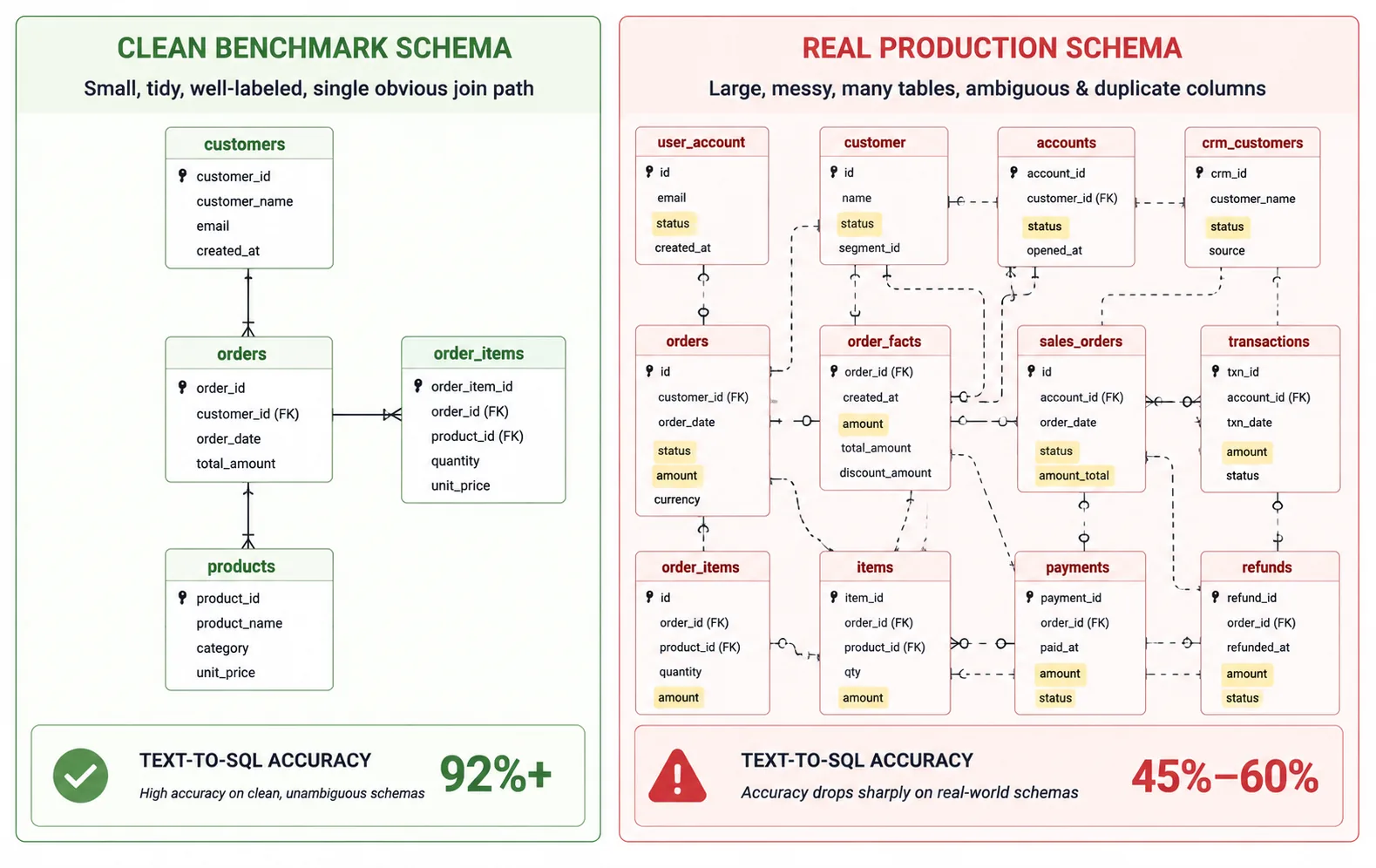
That's a very different number from the 85–95% accuracy figures you'll often see quoted for text-to-SQL tools on standard SELECT/JOIN/GROUP BY queries. Both numbers are true. The gap between them is the entire story: text-to-SQL performance doesn't track the model getting smarter nearly as much as it tracks the structure around the model — how well-defined the schema is, how much business context is available, how ambiguous the underlying question actually is. Clean, well-labeled tables with an obvious question produce great results. Real, sprawling, inconsistently-named production schemas with a genuinely ambiguous business question produce something closer to that 51%.
Why Wrong SQL Doesn't Look Wrong
It's worth being precise about the specific shape of this problem, because it's different from most software bugs. A crashed API call, a failed test, a 500 error — these are failures that announce themselves. A text-to-SQL query that silently returns the wrong number belongs to a much quieter category: it compiles, it executes without error, it returns a well-formed result set, and the only way to know something's wrong is to already know what the right answer should look like — which is precisely the situation someone using an AI assistant to avoid writing SQL themselves is least equipped to be in.
Researchers studying this problem split the underlying failures into two broad families. Schema-based errors happen when the model picks the wrong table, the wrong column, or the wrong join key — a structural mistake in which pieces of the database it reaches for. Logic-based errors happen when the model picks the exact right tables and columns, but the actual query logic — a filter, an aggregation, a join direction — doesn't match what the question actually meant. Both produce a result set. Neither produces an error message. That's the whole problem in one sentence: the model is being asked to infer business meaning that was never explicitly given to it, and when it infers wrong, nothing in the system tells anyone.
The rest of this article is a walk through the five specific ways that shows up most often in practice, roughly in the order you're likely to run into them.
Schema Linking: Picking the Wrong Table or Column
This is the single biggest source of error across the research on this problem, and it's exactly what it sounds like: the model correctly understands what you're asking, but reaches for the wrong piece of the schema to answer it. Real production databases often have several columns that could plausibly answer the same question — a status column on three different tables, a created_at versus an updated_at versus a synced_at, an amount column that's pre-tax on one table and post-tax on another with no naming convention to tell them apart. A human who's worked with the schema for six months knows which one is "the" one. A model seeing the schema for the first time in a prompt has to guess, and it guesses fluently.
Analysis of error patterns on the widely-used BIRD benchmark — a dataset built specifically to reflect messy, large, real-world databases rather than clean textbook schemas — found schema linking errors to be the single largest category of mistake, ahead of join errors, GROUP BY errors, and subquery errors combined. That ordering matters: it means the dominant failure mode isn't the model being bad at SQL syntax. It's the model correctly writing syntactically valid SQL against the wrong piece of your actual data model.
What makes this one especially dangerous is that the resulting query is often extremely plausible on its face. If there are two status columns and the model picks the wrong one, the query still runs, still filters something, still returns a number in a sensible range — it's just quietly answering a slightly different question than the one that was asked.
Join Fan-Out: The Silent Double-Count
This is the one that produces the most dramatic-looking wrong numbers, and it has nothing to do with the model misunderstanding your question — the join and the logic can both be individually correct, and the total can still be wrong. A fan-out happens when a join produces more rows than the table you're trying to measure originally had, because the relationship on the other side of the join is one-to-many. Aggregate a table's own column after that kind of join, and every row on the "one" side gets counted once for every matching row on the "many" side.
Here's the shape of it. Say you want each customer's lifetime order value, and the model — reasonably — joins customers to orders to order_items to also report an item count in the same query:
SELECT
    c.customer_id,
    c.customer_name,
    SUM(o.total_amount) AS lifetime_value,
    COUNT(oi.item_id) AS items_purchased
FROM customers c
JOIN orders o ON o.customer_id = c.customer_id
JOIN order_items oi ON oi.order_id = o.order_id
GROUP BY c.customer_id, c.customer_name;
If a customer placed one order with three line items, that order's total_amount gets pulled into the join three times — once per line item — and SUM adds it three times over. The item count is correct. The lifetime value is inflated, sometimes by a lot, and there is nothing about the output that signals this. It's a real number, in a real currency, that's just wrong, because a query that joins one measure at the order level with another measure at the line-item level needs to account for that mismatch — and an AI assistant, working purely from the question and the schema, has no innate reason to notice the mismatch exists.
The fix is usually to pre-aggregate the "many" side before joining it, so each row on the "one" side only ever meets it once:
-- item count computed separately, once per order, before it ever meets the customer join
WITH order_item_counts AS (
    SELECT order_id, COUNT(*) AS item_count
    FROM order_items
    GROUP BY order_id
)
SELECT
    c.customer_id,
    c.customer_name,
    SUM(o.total_amount) AS lifetime_value,
    SUM(oic.item_count) AS items_purchased
FROM customers c
JOIN orders o ON o.customer_id = c.customer_id
JOIN order_item_counts oic ON oic.order_id = o.order_id
GROUP BY c.customer_id, c.customer_name;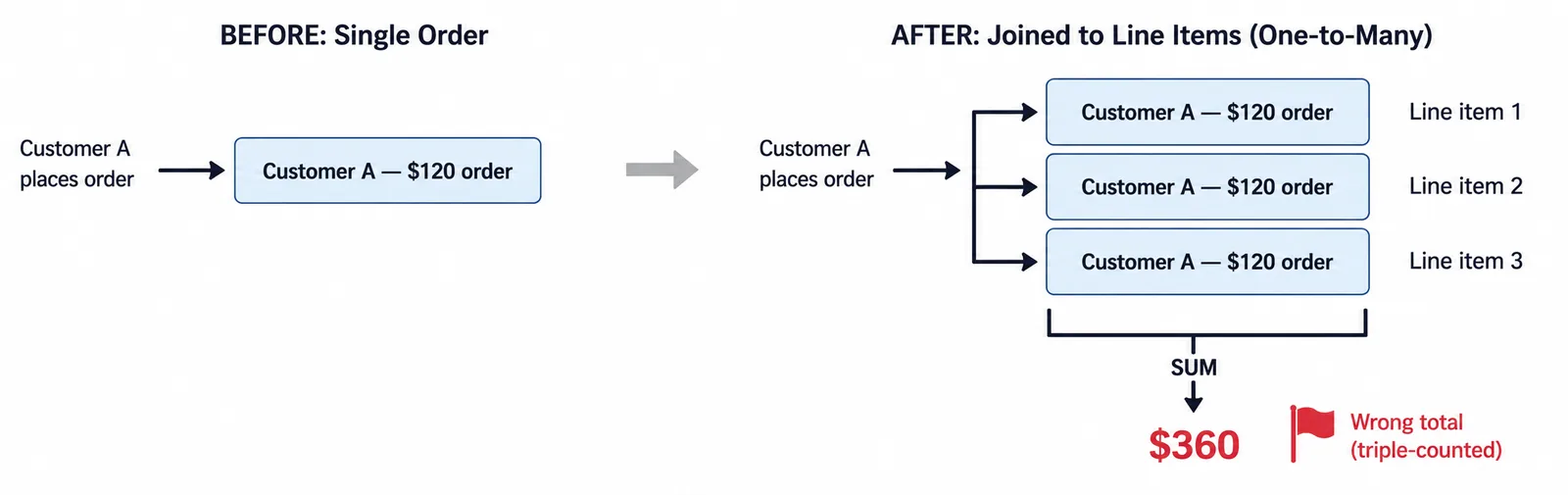
The cheapest way to catch this without reading the whole query line by line: run a plain COUNT(*) on the base table before the join, then again on the joined result. If the second number is bigger, a fan-out is happening somewhere in that join chain, full stop — regardless of how correct the rest of the SQL looks.
Misread Business Logic
The third failure mode is the hardest to catch by inspection, because the SQL is often completely correct relative to what the model understood — it just understood the question slightly wrong. "Active customers" might mean "made a purchase in the last 90 days" to one team and "has a non-cancelled subscription" to another. "Revenue" might or might not include refunds, might or might not include tax, might be recognized on the order date or the fulfillment date depending on which finance rule applies. None of that is written down anywhere the model can see it unless someone explicitly put it in the prompt or the schema documentation — and most schemas don't carry that kind of context.
This is the category researchers call semantic or logic-based errors, and it's distinct from schema linking in an important way: the model can select all the exactly correct tables and columns and still produce the wrong answer, because the actual business definition living in someone's head was never made available to it. A large-scale error analysis of failed queries on the BIRD benchmark found that semantic misinterpretation — the model correctly finding the right pieces of the schema but applying the wrong logic to them — accounted for over a third of all incorrect queries, a category distinct from and nearly as large as pure schema errors.
The practical implication is blunt: no amount of model improvement fixes this category on its own, because the information needed to get it right often doesn't exist in the schema at all. It has to be supplied — as a semantic layer, as documentation, as an explicit definition in the prompt — or the model is guessing at a definition it was never given, no matter how capable it is.
Calendars, Timezones, and "the Obvious Thing That Isn't"
A specific, recurring flavor of the semantic problem deserves its own callout because it's so common and so easy to miss: anything involving time. "This quarter" depends entirely on whether your fiscal year starts in January or, say, April — a model has no way to know your company's convention unless it's told. A timestamp stored in UTC compared against a filter written in the analyst's local timezone can shift results across a date boundary in a way that's completely invisible in the output. "Last 30 days" might mean rolling from today, or from the start of the current month, depending on who's asking and why.
None of these produce SQL that looks unusual. A date filter is a date filter; it's syntactically indistinguishable whether it's using the right calendar convention or not. This category tends to produce results that are close to correct — off by a day, off by one reporting period — which is arguably more dangerous than being wildly wrong, because numbers that are almost right get far less scrutiny than numbers that are obviously off.
GROUP BY and Aggregation Mistakes
The last common category is more mechanical but still easy to miss: aggregating at the wrong grain. A missing column in a GROUP BY clause, or an extra one, changes what "one row" of the result actually represents — sometimes subtly. Grouping by both customer_name and order_total instead of just customer_id, for instance, silently produces a separate row for every distinct name-and-amount combination rather than one row per customer, which looks like a normal result set right up until someone notices the row count doesn't match the customer count.
A closely related version: an AI assistant asked to filter "recent" activity sometimes hardcodes today's date range into the query rather than using a relative expression, which means the query is correct exactly once — the day it was generated — and silently stale every day after, with nothing about the output indicating that the filter has quietly stopped matching what the person asking believes it matches.
| Failure mode | What actually goes wrong | Looks like |
|---|---|---|
| Schema linking | Right question, wrong table or column selected | A normal, well-formed query |
| Join fan-out | Correct join, but aggregation double-counts across a one-to-many relationship | A number that's just too high, with no obvious cause |
| Misread business logic | Right schema, wrong definition applied (e.g. "active," "revenue") | A defensible-looking number that doesn't match another team's |
| Calendar / timezone drift | Wrong fiscal period, timezone, or "recent" window assumed | A number that's close, but off by a day or a period |
| GROUP BY / aggregation | Wrong grain, hardcoded date, or missing group column | A row count that doesn't match what it should represent |
Why Benchmarks Understate This
It's worth addressing directly why the accuracy figures a tool markets can look so much better than what people actually experience. Most published text-to-SQL benchmarks were built on clean, well-documented, relatively small schemas with unambiguous questions — good conditions for showing a model at its best, and not very representative of a real production database that's accumulated five years of tables named by different teams with different conventions.
Newer, deliberately harder benchmarks built specifically around enterprise-scale, real-world schemas exist precisely because the older ones were too forgiving, and they consistently show a meaningfully bigger gap between "looks solved" and "is solved" than the friendlier numbers suggest. The pattern holds across nearly all of this research: give a model a clean schema and an unambiguous question, and it does very well. Give it a real one, with real ambiguity, and accuracy drops sharply — not because the model got worse, but because the test got honest.
Why Semantic Layers Help So Much
If most of this comes down to the model guessing at business meaning it was never given, the fix follows naturally: give it the meaning explicitly, in a form it can rely on instead of infer. That's precisely the argument behind pairing AI assistants with a semantic layer — a governed, single place where "revenue," "active customer," and the actual join paths between tables are defined once, by a human who knows the business, rather than re-guessed by a model on every question.
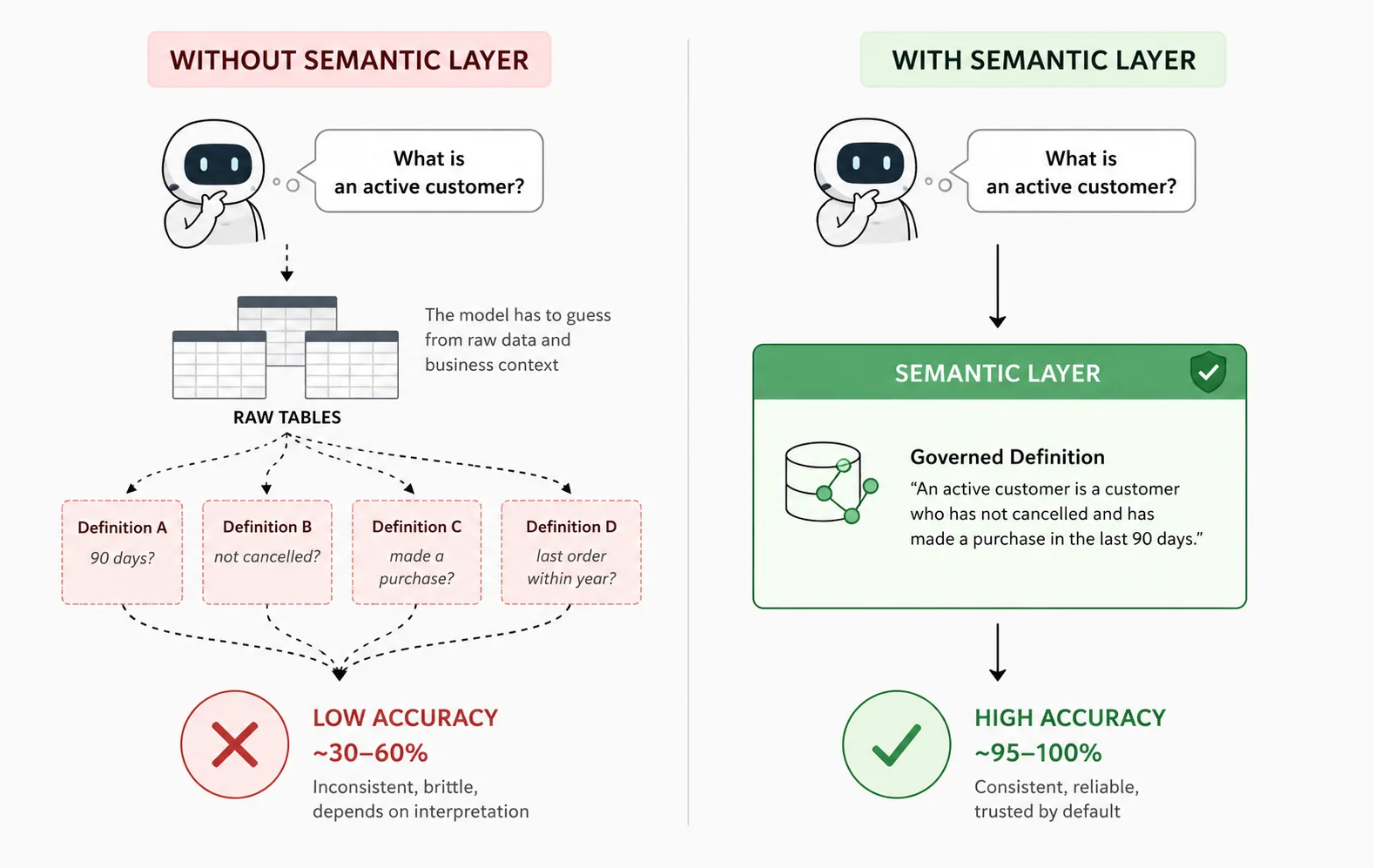
The evidence for this is striking. Rerunning earlier text-to-SQL accuracy comparisons in 2026 against a well-modeled semantic layer instead of raw tables found accuracy on covered queries approaching 100%, with correct answers across the majority of natural-language questions tested — a dramatic jump from the same kind of raw-schema numbers discussed earlier in this piece. The pattern lines up with the failure modes above almost exactly: schema linking errors mostly disappear when the model is choosing from a small set of named, defined metrics instead of guessing across dozens of ambiguous columns, and misread business logic mostly disappears when "active customer" has exactly one definition instead of an implicit one buried in someone's head.
This isn't an argument that a semantic layer is required before anyone's allowed to ask an AI a data question — plenty of quick, low-stakes exploration doesn't need that overhead. It's a much narrower and more useful claim: the more a number is going to influence a real decision, the more that number should be coming from a governed, defined source rather than a fresh guess against raw tables, however articulate the guess looks.
The Verification Checklist
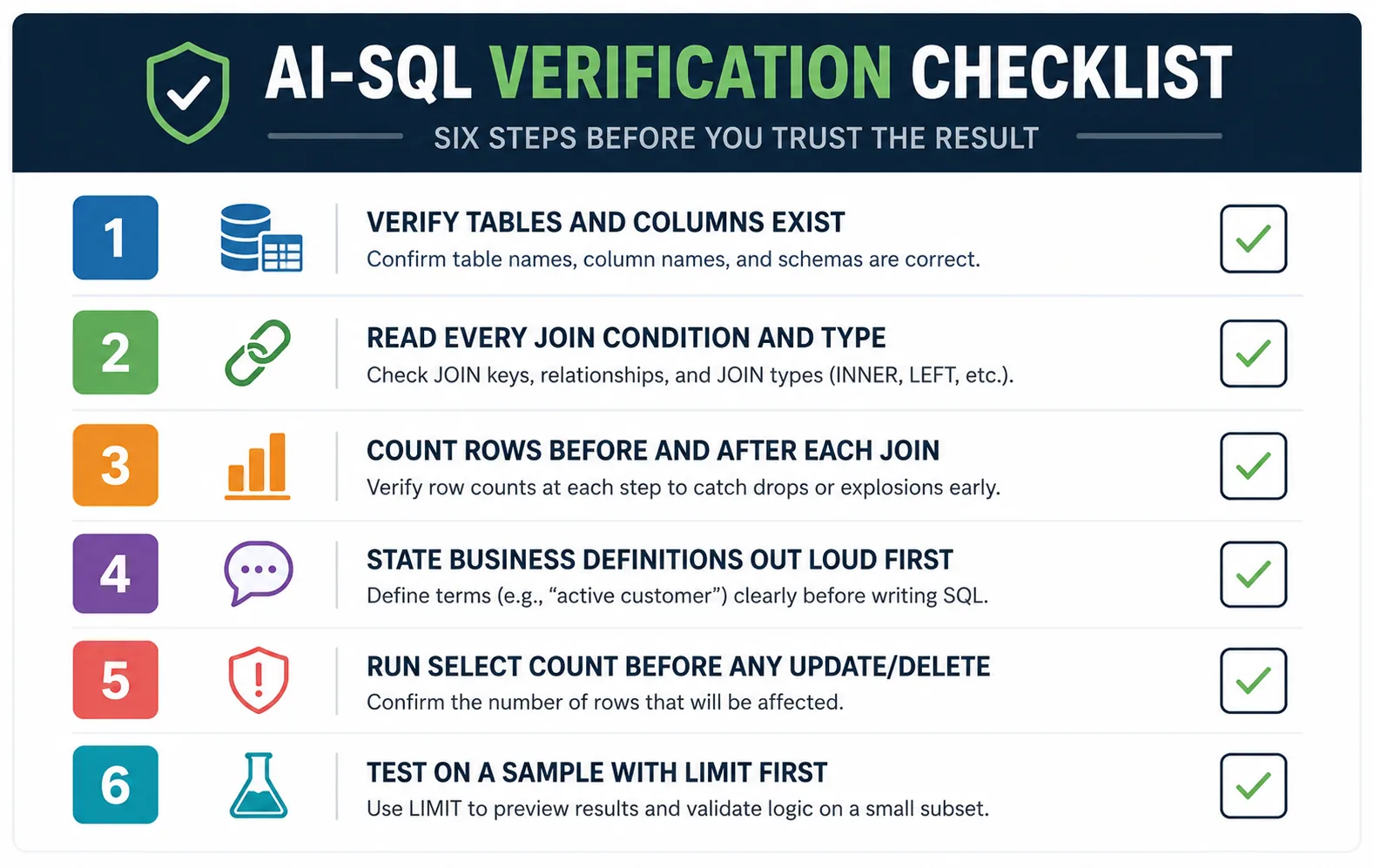
None of the above is an argument against using AI to write SQL — it's an argument for treating the output the way you'd treat a first draft from a contractor you've just met: probably fine, occasionally confidently wrong, worth a specific, repeatable check before it touches anything that matters. Here's what that check actually looks like in practice.
Verify every table and column actually exists. Models occasionally reference plausible-sounding columns that were never in the schema, or the right column name from the wrong table. This takes seconds to check and catches a real category of error.
Read the JOIN conditions and JOIN types explicitly. An INNER JOIN where a LEFT JOIN was needed silently drops rows. A join with no explicit condition, or one written as an implicit comma join, can quietly produce a cartesian product that's technically "correct SQL" and practically nonsense.
Count before and after every join. Run a plain row count on the base table, then on the joined result. If the joined count is higher, a fan-out is happening somewhere in that chain — this single habit catches failure mode 2 almost every time, without needing to fully reason through the join logic.
State the business definitions out loud before you check the query. Decide what "active," "revenue," or "this quarter" means for your team first, independently of the SQL, then check the query against that definition rather than the other way around — otherwise it's easy to unconsciously read the query's logic back into your own definition.
Before any UPDATE or DELETE, run the equivalent SELECT with COUNT first. If an AI-generated DELETE comes with a WHERE clause, run SELECT COUNT(*) with that same clause first. If the row count surprises you, stop — that's the cheapest possible check before something irreversible runs.
Test on a sample before the full table. Add a LIMIT while verifying logic, and only remove it once the shape of the result looks right. This is especially worth doing before pointing any AI-generated query at a full production table for the first time.
What a Safe Review Workflow Looks Like
Individually, each of the checks above is quick. The mistake most teams make is treating them as optional extra effort rather than building them into how AI-assisted SQL gets used at all. A more durable version of this looks like layered validation rather than a single manual glance: a structural pass that confirms every referenced table and column is real and flags obviously dangerous patterns, a non-production test against a staging copy of the data for anything that writes, and — for queries that are going to repeatedly feed a dashboard or a report rather than answer a one-off question — a deliberate move toward a governed definition (a semantic layer, a documented metric, a reviewed and saved query) rather than re-generating a fresh, ungoverned guess every single time the question comes up.
The single most important mental shift is treating a confident-looking result as neutral information rather than a substitute for verification. A model producing a plausible number tells you it found something to compute — it doesn't tell you the number is right, and unlike a compiler error or a failed test, nothing about the interface signals the difference between the two cases. The check has to come from you, every time, until the number is coming from somewhere governed enough that it doesn't need to.
The Bottom Line
Text-to-SQL is a genuinely useful capability, and none of this is an argument for avoiding it. It's an argument for being precise about what it's actually good at: quick exploration, low-stakes questions, a faster first draft on a query you were going to write and review yourself anyway. Where it needs a second look is exactly where it looks most trustworthy — a clean, well-formatted query that runs without error and returns a number sitting comfortably in the range you expected.
The failure modes in this piece aren't edge cases or early-days rough patches. They're structural, well-documented, and they show up specifically because the model is being asked to infer business meaning — which table, which definition, which calendar — that often was never made explicit anywhere it could see it. The fix isn't a smarter model; it's giving the model (and the person reviewing its output) the context it's currently missing, and building a habit of checking for exactly these five things before a number generated in seconds gets to influence a decision that matters.
— If you've caught a wrong-but-confident-looking AI-generated query in the wild, I'd genuinely like to hear the specifics — drop a comment. Real examples are how this list gets longer and more useful.
One email, every other week.
New posts on data engineering, applied AI, and the business decisions around them. No noise, unsubscribe anytime.
Comments
All comments are reviewed before they appear publicly — this keeps spam out.
Loading comments…