We Built a Free SQL Formatter. Here's Why.
A short note on tools.techedge.in, what SQL formatting actually does for a query, and what we're building next for data teams.
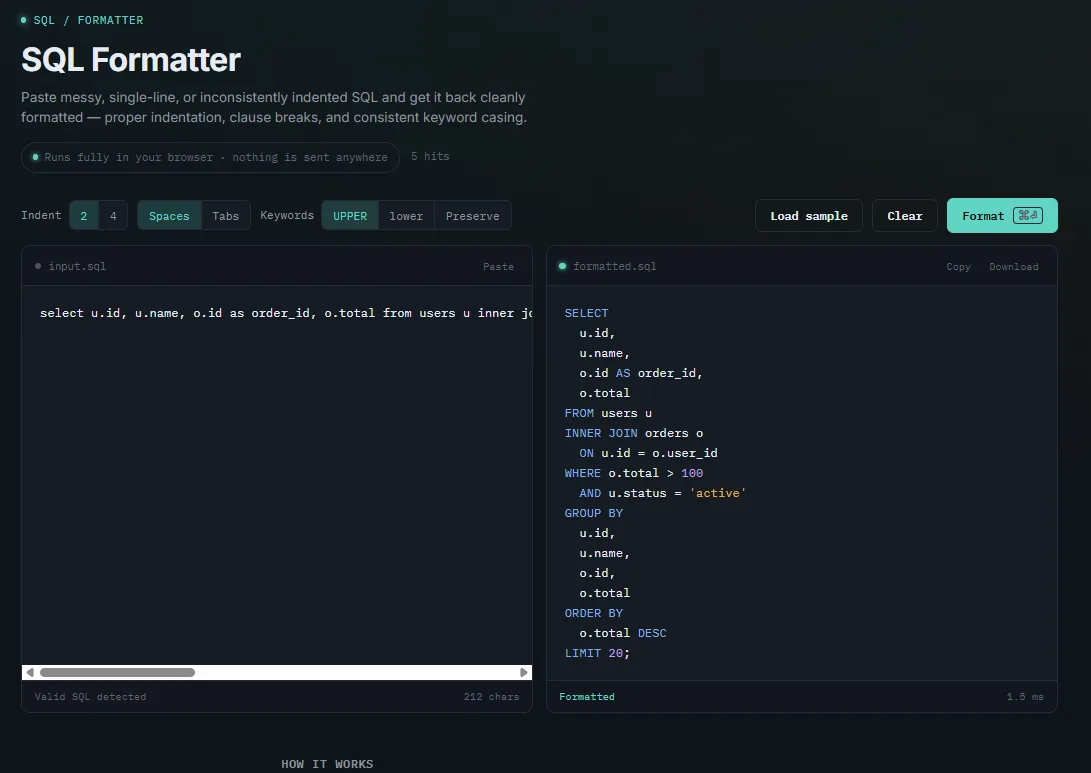
Every few weeks, someone on a data team pastes a query into a Slack thread and it lands as one dense, unbroken line — no indentation, no line breaks, keywords in whatever case the person happened to type them in. Everyone squints at it for a second longer than they should, then someone reformats it by hand just so the thread is readable. That small, recurring bit of friction is the entire reason tools.techedge.in/sql-formatter.html exists.
This post is a straightforward one: what SQL formatting actually does, why it matters more than it looks like it should, what our formatter currently does and doesn't do, and where we're taking it next.
Why We Built This
We didn't set out to build a tools business. techedge.in started as a place to write about data engineering and analytics, and the tools came out of the same itch that produces most useful software: we kept needing something small and specific, kept not quite trusting the free version of it we found online, and eventually decided it was faster to just build our own.
A SQL formatter is about as unglamorous as tools get, which is exactly why it was the right first one to ship. Almost everyone who touches data — analysts, analytics engineers, data engineers, even product managers reading a query someone sent them — runs into messy SQL constantly. It's a genuinely universal, low-stakes, high-frequency annoyance, and that combination makes it a good test of whether we could ship something people would actually open more than once.
What SQL Formatting Actually Means
"Formatting" sounds cosmetic, so it's worth being precise about what's actually happening. A SQL formatter doesn't just add some spaces — it parses your query into its actual structural pieces (clauses, expressions, subqueries, function calls) and then reprints that same structure following a consistent set of rules. Three things typically change:
Indentation and line breaks. Each major clause — SELECT, FROM, WHERE, GROUP BY, ORDER BY — starts its own line, with column lists, conditions, and subqueries indented underneath to show what belongs to what. A query that was one unreadable line becomes a shape you can scan in half a second.
Keyword casing. SQL doesn't care whether you write select or SELECT, but people do, and a codebase where half the queries use one convention and half use the other reads like it was written by a committee that never met. A formatter picks one convention — upper, lower, or leave-as-written — and applies it everywhere, automatically.
Structural consistency. Nested subqueries, CASE expressions, and multi-condition WHERE clauses all get indented the same way every time, regardless of who wrote the original query or what mood they were in when they typed it. That consistency is the actual point — not any single query looking nicer, but every query in a codebase looking like it came from the same place.
Why It Matters More Than It Seems
It's easy to file this under "nice to have" until you notice how much of the actual friction in working with a shared SQL codebase traces back to inconsistent formatting rather than anything about the logic itself.
Code review gets harder without it. When formatting is inconsistent, a one-line logic change can produce a diff that touches forty lines, because the reviewer's editor re-wrapped or re-indented half the query along the way. Reviewers end up scanning past noise to find the actual change, which is exactly the kind of friction that makes people review less carefully than they mean to.
Onboarding gets slower. A new analyst or engineer joining a team has to learn the business logic and decode five different personal formatting styles scattered across the existing queries, as if the codebase were written in five slightly different dialects. A shared, consistent style removes one whole axis of things they have to figure out before they can focus on what actually matters.
Debugging gets slower too. A gnarly query with six joins and three subqueries crammed onto a handful of lines takes real effort just to trace through, before you've even started reasoning about whether the logic is correct. The same query, properly indented, often reveals its own bug — a misplaced AND, a join condition that doesn't line up — just from being laid out clearly enough to see.
None of this is really about aesthetics. It's about reducing the number of things a person has to hold in their head before they can get to the part of the work that actually requires thinking.
What the Formatter Does Today
The current version is intentionally simple — a single page, no account, no setup. Paste a query, hit format, get a clean result back. Right now it supports:
- Adjustable indentation — 2 or 4 spaces, or tabs, so the output matches whatever convention your team already uses.
- Keyword case control — force every keyword to
UPPER,lower, or leave the original casing untouched. - Proper clause and subquery indentation — nested subqueries,
CASEexpressions, and joins all get laid out on their own lines at the correct depth, not just the top-level clauses. - One-click copy and download — grab the formatted result as text or save it straight to a
.sqlfile. - A sample query — for anyone who just wants to see what it does before pasting anything real in.
The detail we get asked about most, though, isn't a formatting option — it's that the whole thing runs entirely in your browser. Your query is parsed and reformatted client-side, in JavaScript that ships to your browser once and then runs locally; nothing gets sent to a server, logged, or stored anywhere. For a tool people use specifically to paste real production queries — sometimes containing table names, business logic, or details they'd rather not hand to a third party — that wasn't a nice-to-have. It was the actual design constraint the whole tool was built around.
A Quick Before-and-After
Here's the kind of one-liner that shows up in a Slack thread or a hastily-written script, run through the formatter with default settings:
select id, name, email from users where status = 'active' and age > 18 order by created_at desc limit 10;SELECT
id,
name,
email
FROM users
WHERE status = 'active'
AND age > 18
ORDER BY created_at DESC
LIMIT 10;Nothing about the query's logic changed. What changed is that you can now read it in the time it takes your eyes to move down the page once, instead of having to mentally re-parse a run-on sentence of SQL first.
Why We Built Our Own Instead of Pointing People Elsewhere
Free SQL formatters already exist, so it's a fair question why we didn't just link to one of them in a "here are some useful tools" post instead. A few reasons tipped it toward building our own:
Privacy, specifically. A lot of the existing free formatters work by sending whatever you paste to a server to be processed. Most people don't read that closely enough to notice, and most of the time it probably doesn't matter — but "probably doesn't matter" isn't a great standard for a tool people use specifically on real, sometimes sensitive production queries. Running everything client-side removes that question entirely, rather than asking people to trust a privacy policy.
No account, no friction. A one-off formatting task shouldn't require creating an account, verifying an email, or clicking through a paywall after your third free use in a day. The tool should be exactly as available as a calculator.
It fits where we're already headed. tools.techedge.in is meant to become a small, growing set of no-nonsense utilities for data teams — the kind of thing you bookmark once and open without thinking about it. A SQL formatter is a natural, low-risk first entry, and building it ourselves means every future tool in that family shares the same values around privacy and simplicity, instead of us bolting those values onto someone else's product after the fact.
What's Next
This first version is deliberately narrow, and there's a clear list of what we're adding as we go:
- Dialect-aware formatting. Snowflake, BigQuery, Postgres, and Redshift all have small syntax quirks the current formatter treats generically. Dialect-specific rules are next, so formatting doesn't fight your warehouse's own syntax.
- A minify mode. The reverse of what it does today — collapsing a formatted query back down for cases like embedding SQL in application code where compact output actually matters.
- More style presets. Comma placement (leading vs. trailing), alignment of
ASaliases, and a couple of the more common community style guides as one-click presets instead of manual settings. - An editor extension. A lightweight VS Code extension so formatting can happen on save, without a browser tab in the loop at all.
- Shareable links. An optional way to generate a link to a formatted query for quickly sharing a clean version in a ticket or a doc, still without anything being stored server-side by default.
None of this is set in stone by release date — it's a rough order of what we think is actually useful, and it'll shift based on what people ask for.
Try It
If you've read this far, you've probably already pasted worse SQL into a Slack thread than the example above. The formatter is free, doesn't need an account, and runs entirely in your browser: tools.techedge.in/sql-formatter.html.
— This is the first in an ongoing series about the tools we're building for data teams at tools.techedge.in. If there's a small, annoying, recurring problem in your own SQL workflow, drop a comment — that's exactly the kind of thing we're looking to build next.
One email, every other week.
New posts on data engineering, applied AI, and the business decisions around them. No noise, unsubscribe anytime.
Comments
All comments are reviewed before they appear publicly — this keeps spam out.
Loading comments…