The dbt Semantic Layer Explained: One Definition of "Revenue," Everywhere
How MetricFlow and the dbt Semantic Layer let you define a metric once on top of your models and query it consistently from any BI tool — and why that matters even more now that AI agents are generating queries too.
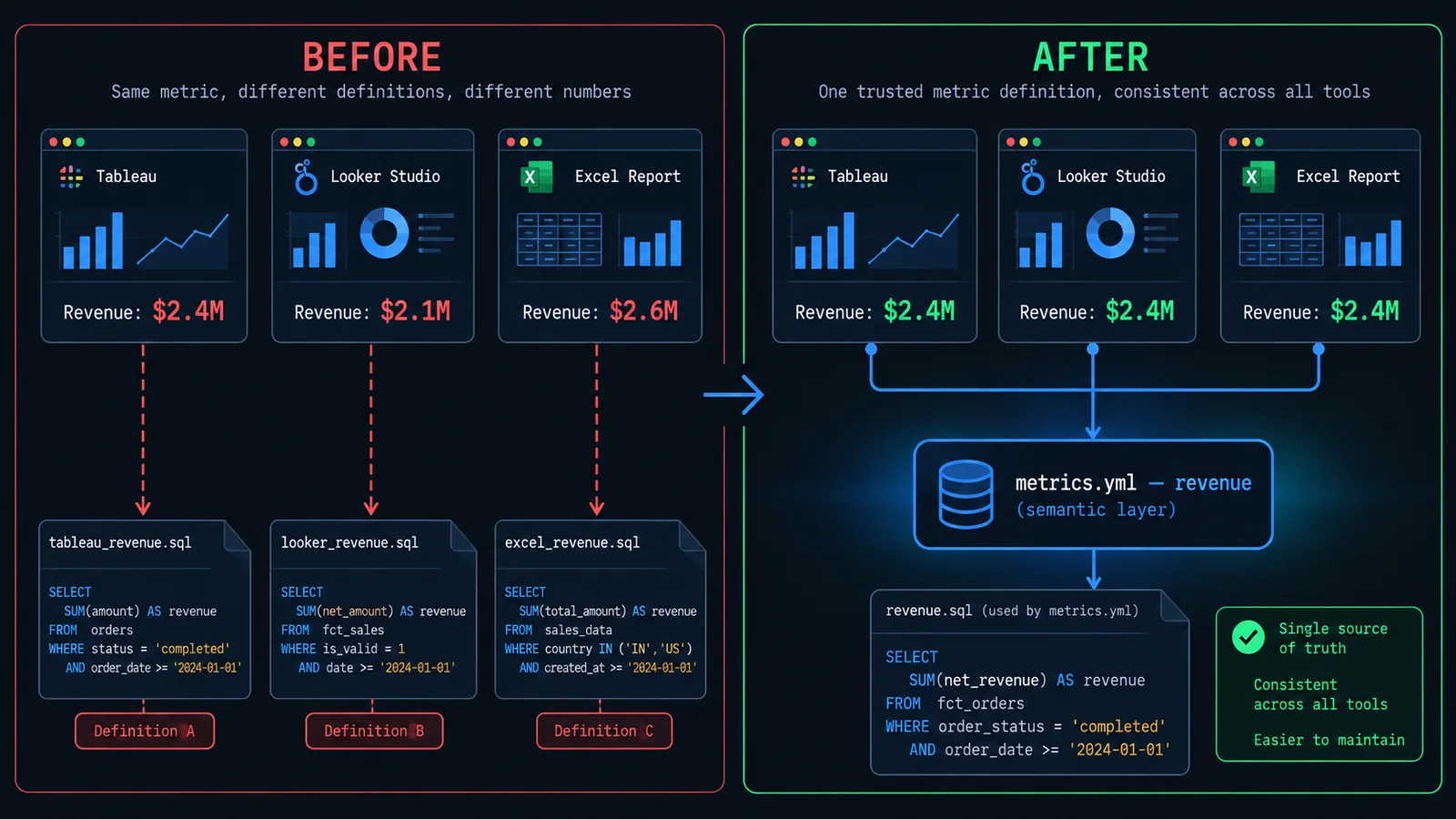
The Problem: Metric Drift Across Dashboards
Every data team eventually has this meeting. Someone pulls up the Tableau dashboard and says revenue was $2.4M last month. Someone else has the same number open in a Looker Studio report and says $2.1M. A third person has a spreadsheet, exported from the warehouse by hand three weeks ago, that says $2.6M. Nobody is lying. Nobody made a typo. Three different people wrote three reasonable SQL queries against the same underlying tables, and each one made a slightly different, entirely defensible decision along the way — whether to include tax, whether to net out refunds, which date column to filter on, whether a cancelled-then-refunded order counts at all. Multiply that by every metric your company cares about, and by every analyst, dashboard author, and BI tool that's ever touched the warehouse, and you get an organization where nobody fully trusts any number they didn't personally calculate.
This is metric drift, and it isn't a data quality problem in the traditional sense — the underlying data can be completely accurate and this still happens. The rows in your orders table can be perfectly correct, every foreign key valid, every test green, and you can still end up with four different values for "monthly active users" because four different people wrote four different definitions of what counts as "active," in four different places, at four different times, with no mechanism forcing any of them to agree. The tables were never the problem. The definitions were.
The traditional response to this has been governance by tribal knowledge and Slack archaeology — someone remembers that the "official" revenue number lives in a specific dashboard built by a specific analyst two years ago, and everyone else is quietly expected to match it, usually by copying that dashboard's SQL and pasting it somewhere else, which starts a fresh copy that will itself drift the moment the original definition changes and this copy doesn't get updated. Calculated fields inside a BI tool make this worse, not better, because they live outside version control, outside code review, and usually outside anyone's field of view except the one person who built that particular workbook. A metric defined as a Tableau calculated field is a metric that exists exactly once, is invisible to every other tool, and has to be manually reinvented — correctly, hopefully — anywhere else it's needed.
What actually fixes this isn't tighter documentation discipline or a bigger data dictionary, both of which rot the moment nobody's actively maintaining them. It's removing the opportunity for drift to happen at all — defining "revenue" exactly once, in exactly one place, backed by version control and code review the same way application logic is, and then making every tool that needs revenue ask that one place for the answer instead of writing its own SQL against the raw tables. That's the entire premise of a semantic layer, and it's the subject of this article: what one actually is, how dbt's implementation of the idea — MetricFlow, wrapped in what dbt Labs currently calls the dbt Semantic Layer — works in practice, and why this matters more now that it's not just BI tools asking for numbers, but AI agents generating their own queries against your warehouse on demand.
What a Semantic/Metrics Layer Actually Is
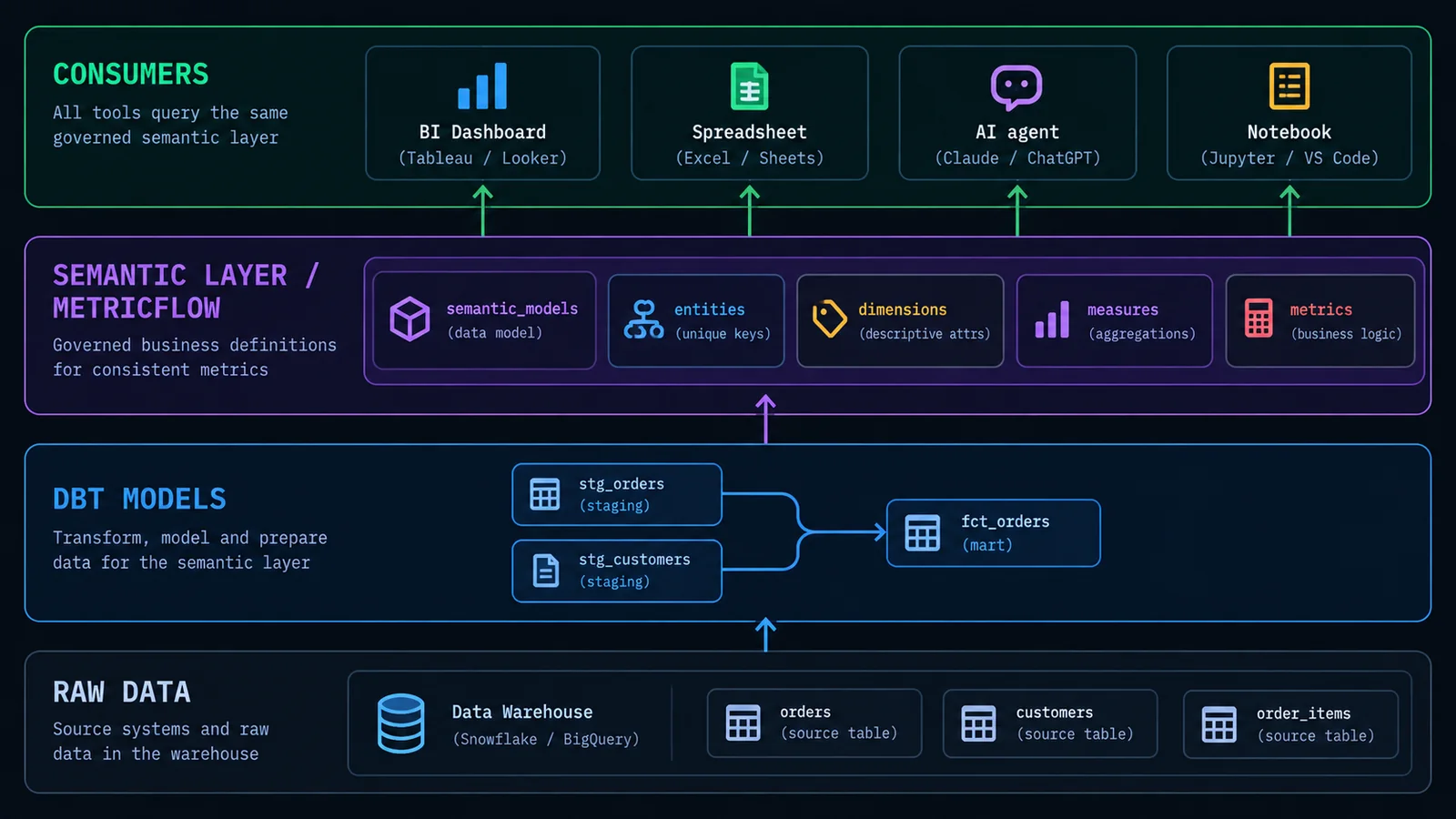
Strip away the vendor branding and a semantic layer is a fairly simple idea: a layer of abstraction that sits between your raw, physical data model and the tools that consume it, translating business concepts — "revenue," "active customer," "churn rate" — into the actual SQL needed to compute them, on demand, against whichever warehouse table structure happens to sit underneath. Nobody querying the semantic layer needs to know which tables to join, which column holds the pre-tax versus post-tax amount, or which status values count as "active." They ask for the metric by name, optionally sliced by some dimension, and the semantic layer generates the correct SQL and hands back a result.
It's worth being precise about the distinction between a semantic layer and a metrics layer, because the terms get used almost interchangeably in casual conversation but aren't quite the same scope of thing. A metrics layer, narrowly, is concerned with metric definitions specifically — the approved list of "revenue," "gross margin," "active users," and how each one is calculated. A semantic layer is the broader concept: metrics plus the dimensions you can slice them by, the entities and join paths that connect your tables, access controls over who can see what, labels and descriptions for a business-friendly catalog, and often a query API and caching layer to serve all of it efficiently. In practice, most modern tools — including dbt's — blur this distinction on purpose, because a metric without governed dimensions to slice it by is only half useful, and a join path without a place to hang consistent metric definitions on top of it is only half finished. When people say "semantic layer" today they usually mean the whole package: definitions plus the infrastructure to serve them consistently.
The core promise, regardless of which specific product implements it, is one definition, many consumers. Define "revenue" once, with a specific SQL expression, a specific aggregation, a specific set of business rules about what counts and what doesn't — and then Tableau, Looker, a Python notebook, a scheduled export, and an AI agent answering a Slack question all ask that same definition for the answer, rather than each independently reconstructing their own version of it. If the definition changes — finance decides refunds should net out of revenue starting next quarter — you change it in one place, and every downstream consumer picks up the new logic automatically, the same day, without anyone having to hunt down and edit six separate calculated fields scattered across six separate tools.
This isn't a new idea — Business Objects, Cognos, and later Looker's LookML all built commercially successful products around some version of this concept decades before "semantic layer" became the term people reach for in 2026. What's changed recently, and what makes this worth a fresh look, is where the semantic layer now sits in the stack. Older implementations tended to be bolted onto a specific BI tool, which meant the moment you used a second BI tool, you were back to square one, reimplementing the same metric definitions a second time in a second proprietary modeling language. The newer generation of tools — dbt's Semantic Layer chief among them — deliberately decouple the metric definitions from any single BI tool, sitting instead directly on top of your transformation layer, so the definitions are portable across whatever consumes them, BI tool or otherwise.
dbt's Semantic Layer and MetricFlow
Naming here has genuinely shifted over the years, and it's worth being precise about the current state rather than repeating what was true two or three years ago, because dbt Labs' first attempt at this problem is not the product that exists today. If you first read about dbt's semantic layer ambitions back in 2022, what you read is mostly obsolete — dbt Labs shipped an initial version of a semantic layer that year, built around a package called dbt_metrics, and by most accounts it fell short of what the market actually needed: limited metric types, a modeling approach that didn't scale well to complex businesses, and reception from the analytics engineering community that was, generously, lukewarm.
What changed the trajectory was an acquisition. In February 2023, dbt Labs acquired Transform, a startup that had built its own semantic layer product around an open-source query engine called MetricFlow. Rather than iterating on the original in-house approach, dbt Labs went all-in on MetricFlow as the new standard, rebuilding the semantic layer on top of it starting with dbt Core 1.6. That rebuild took real time — roughly eighteen months of development — and the current dbt Semantic Layer, powered by MetricFlow, reached general availability in October 2024, formally replacing the deprecated dbt_metrics package. MetricFlow itself is open source under the Apache 2.0 license, maintained by dbt Labs, and its job is narrow but central: it's the query-generation engine that reads your semantic model and metric definitions, written in YAML, and compiles them into the actual SQL that runs against your warehouse at query time, resolving joins, applying the correct aggregation, and handling time-based logic like cumulative windows automatically.
Terminology worth locking down before going further: MetricFlow is the engine — the thing that actually reads your YAML and generates SQL. The dbt Semantic Layer is the broader product built around that engine — the hosted query interfaces, the BI tool integrations, the access controls, the caching. You'll sometimes see "dbt Semantic Layer" used loosely to mean the whole system including MetricFlow, and that's a reasonable shorthand; just don't confuse MetricFlow the open-source library (which you can, with limitations, run and query locally via the MetricFlow CLI even outside a paid plan) with the fully hosted dbt Semantic Layer product, which is a dbt Cloud — now more broadly branded as the dbt platform — feature, not something available in bare dbt Core. Deploying a semantic layer for actual production querying requires running a dbt job on dbt Cloud to build and serve the metrics; dbt Core alone will let you define and validate semantic models and metrics locally, and even query them through the MetricFlow CLI for development, but the governed, multi-tool serving layer sits on the paid platform.
If you haven't worked with dbt before, or want the fuller picture of what a dbt project actually looks like underneath — models, the DAG, testing, materializations — this site's introduction to dbt is the right place to start; everything from here on assumes you already have a working mental model of what a dbt project is. The semantic layer builds directly on top of that: semantic models aren't a replacement for dbt models, they're a thin YAML-defined layer that references existing dbt models by name and adds metric-relevant metadata — entities, dimensions, measures — on top of tables you've already built and already tested.
Key Concepts: Measures, Dimensions, Entities, Metrics
MetricFlow's whole vocabulary rests on four ideas, and getting comfortable with the distinction between them is most of the learning curve. Everything else — metric types, query syntax, how BI tools consume the layer — is built on top of these four concepts, so it's worth spending real time here rather than skimming toward the metric-type examples.
Semantic models: the entry point
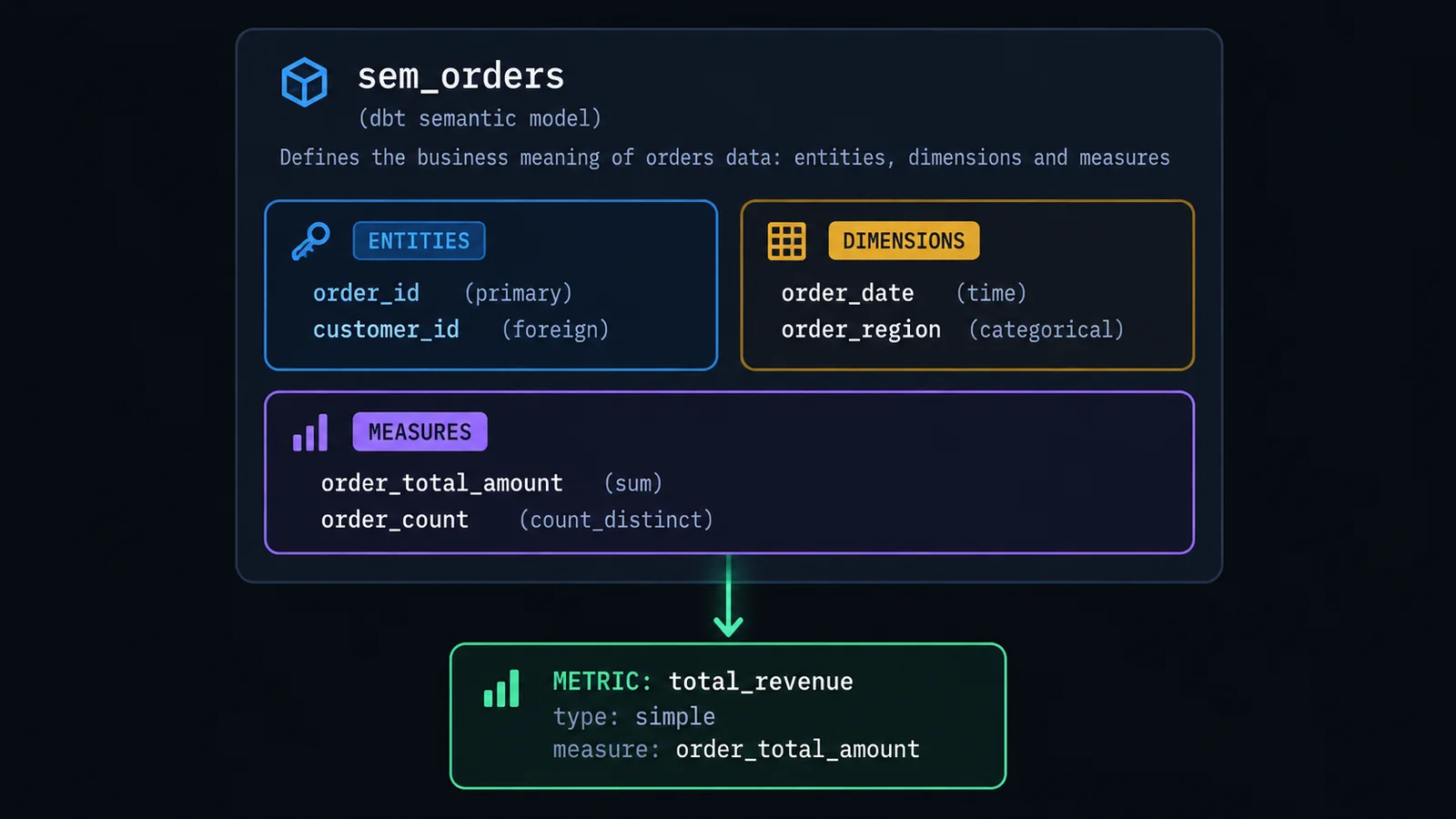
A semantic model is the starting point — it corresponds to one dbt model (a table or view you've already built with ref()-based dbt models) and describes what's inside it in terms MetricFlow can reason about: what entities it contains, what dimensions it can be sliced by, and what measures can be aggregated from it. You can define more than one semantic model on top of the same underlying dbt model if it genuinely serves two different analytical purposes, but the common case is a roughly one-to-one relationship between a mart-layer dbt model and a semantic model built on top of it.
semantic_models:
  - name: orders
    description: "One row per order, from the fct_orders mart model."
    model: ref('fct_orders')
    defaults:
      agg_time_dimension: order_date

    entities:
      - name: order_id
        type: primary
      - name: customer_id
        type: foreign

    dimensions:
      - name: order_date
        type: time
        type_params:
          time_granularity: day
      - name: order_region
        type: categorical
        expr: region_name
      - name: order_status
        type: categorical

    measures:
      - name: order_total_amount
        description: "Order value, net of tax and refunds."
        agg: sum
        expr: net_order_amount
      - name: order_count
        agg: count_distinct
        expr: order_id
Entities: the join keys
An entity is, functionally, a join key — a real-world concept like a customer, an order, or a subscription that connects one semantic model to another. If it helps to just think of entities as join keys, that's a reasonable simplification of the concept. MetricFlow currently recognizes four entity types: primary, exactly one non-null, unique value per row, covering every record (the natural primary key of the model); unique, similar but allowed to be null and to represent a subset of records; foreign, which can repeat, can be null, and represents a reference to a primary or unique entity defined on a different semantic model; and natural, used specifically for slowly changing dimension (SCD Type II) modeling, where a natural business key persists across multiple physical rows that each represent a different validity window for that entity.
What makes entities powerful rather than just decorative metadata is that MetricFlow uses them to figure out join paths automatically. Declare customer_id as a foreign entity on your orders semantic model and as the primary entity on your customers semantic model, and MetricFlow now knows, without you writing a single line of join SQL, that a query asking for order revenue sliced by customer region can traverse from orders to customers safely. This is the same underlying idea as ref() building dbt's model-level DAG — covered in more depth in the dbt introduction — applied one layer up, at the semantic level instead of the table level.
Dimensions: how you slice and filter
A dimension is any attribute you'd want to group by or filter on — order region, customer tier, product category, signup channel. MetricFlow supports two dimension types. Categorical dimensions are discrete, non-time attributes, and can be a direct column reference or a computed expr (a CASE statement collapsing forty raw status codes into five clean buckets, for instance). Time dimensions get special treatment, because so much of real analytics is time-based: they carry a required time_granularity (day, week, month, quarter, year), and MetricFlow uses that granularity to automatically roll a metric up or down to whatever grain a query asks for — daily revenue, rolled up to weekly, without you writing separate SQL for each grain.
Measures: the raw aggregations
A measure is a single column-level aggregation — the direct building block a metric is made from. Every measure needs an agg type: sum, min, max, average, count_distinct, sum_boolean (useful for counting how many rows satisfy a boolean condition), median, or percentile (which additionally needs an agg_params block specifying which percentile). It's worth noting explicitly that in dbt's current YAML spec, measures are technically being folded toward "simple metrics" under the hood — a measure with create_metric: true will auto-generate a matching simple metric for you — but the underlying concept, a single column-level aggregation feeding into a metric, is unchanged regardless of which side of that YAML migration your project sits on.
Metrics: the thing people actually ask for
A metric is what everything above exists to produce — the named, business-facing quantity that a BI tool or a person actually queries for by name. A metric is always built from one or more measures (or, for some types, from other metrics), with a type that determines how those inputs get combined. That's the subject of the next section, because the four (in fact, dbt currently ships five) metric types are different enough from each other that they deserve worked examples rather than a one-line definition each.
Metric Types: Simple, Ratio, Cumulative, Derived
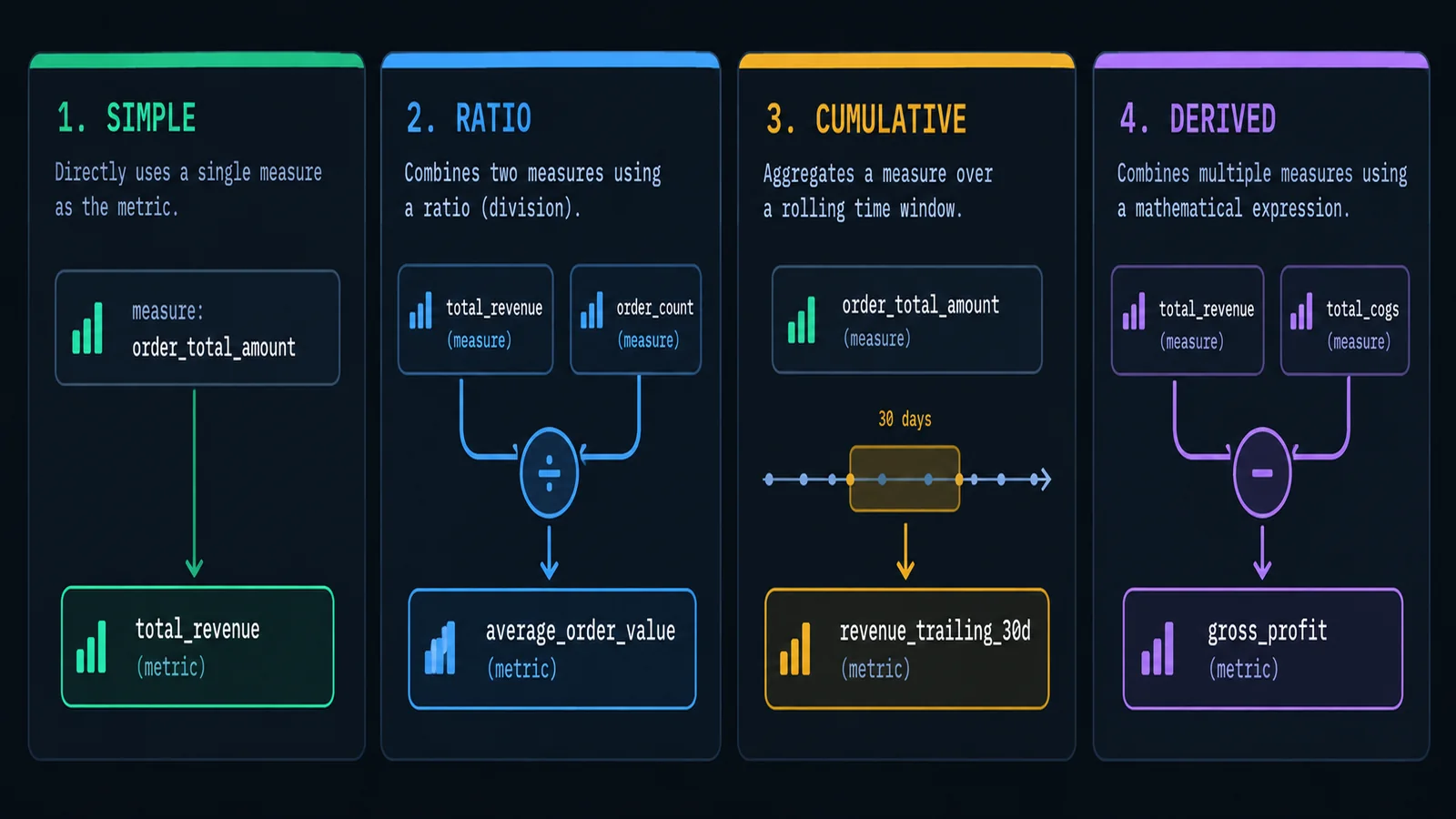
MetricFlow currently supports five metric types in its YAML spec — simple, ratio, cumulative, derived, and conversion. The first four are the ones you'll reach for constantly and are the focus here; conversion metrics are a narrower, more specialized fifth type worth knowing exists (they measure whether a base event and a subsequent conversion event both occurred for the same entity within a time window — useful for funnel-style analysis like "signed up, then made a purchase within 7 days") but they come up far less often in day-to-day metric definition than the core four.
Simple metrics
A simple metric is the base case: a direct reference to exactly one measure, with no additional combination logic. Most of the metrics in a real project are simple metrics — total revenue, order count, distinct customers. This is deliberately the least interesting metric type, and that's the point: it should be the default, reached for constantly, with the other three types used only when a definition genuinely can't be expressed as a single aggregation.
metrics:
  - name: total_revenue
    description: "Net order revenue, after tax and refunds."
    type: simple
    type_params:
      measure: order_total_amount
    label: "Total Revenue"
Ratio metrics
A ratio metric divides one metric by another — a numerator and a denominator, each itself a reference to an underlying measure (or, in more advanced cases, filtered independently of one another). Average order value, conversion rate, refund rate as a percentage of revenue — all naturally ratio metrics. The value of defining these explicitly as ratio metrics rather than writing the division directly in a BI tool is that the numerator and denominator each go through the same governed measure definitions everything else does, and each can carry its own independent filter if the business logic genuinely requires asymmetric filtering on the two sides.
metrics:
  - name: average_order_value
    description: "Total revenue divided by order count."
    type: ratio
    type_params:
      numerator: total_revenue
      denominator: order_count
    label: "Average Order Value"
Cumulative metrics
A cumulative metric aggregates an input metric across a rolling or to-date time window rather than a fixed period — trailing-30-day active users, year-to-date revenue, a running total since the start of a fiscal year. This is the metric type that most directly saves you from writing (and maintaining, and getting subtly wrong) hand-built window-function SQL, because MetricFlow handles the window logic based on a small set of declarative parameters: a window for a rolling period, or a grain_to_date for a running total that resets at a fixed calendar boundary.
metrics:
  - name: revenue_trailing_30d
    description: "Rolling 30-day revenue as of any given day."
    type: cumulative
    type_params:
      measure: order_total_amount
      window: 30 days

  - name: revenue_ytd
    description: "Revenue, reset at the start of each fiscal year."
    type: cumulative
    type_params:
      measure: order_total_amount
      grain_to_date: year
Notice the two variants aren't interchangeable: window gives you a rolling lookback that moves with every day you query, while grain_to_date gives you a running total that snaps back to zero at each new period boundary. Picking the wrong one silently produces a metric that's directionally right but numerically wrong for anyone comparing against a finance report that used the other convention — which is exactly the kind of subtle, hard-to-spot-by-eyeballing error a governed metric definition is supposed to prevent, not just relocate.
Derived metrics
A derived metric is computed from other metrics — not from measures directly — using an arbitrary expression. Gross profit as revenue minus cost, period-over-period growth as this period's value against a lagged copy of itself, contribution margin as a percentage built from two other already-defined metrics. This is the metric type that lets you build up genuinely complex business logic in layers, the same way a mart-layer dbt model builds on staging models rather than reimplementing raw-table logic from scratch every time — the DRY principle applied to metrics instead of SQL.
metrics:
  - name: gross_profit
    description: "Total revenue minus cost of goods sold."
    type: derived
    type_params:
      expr: total_revenue - total_cogs
      input_metrics:
        - total_revenue
        - total_cogs
The practical discipline this encourages is worth calling out on its own: once total_revenue exists as a governed simple metric, every other metric that needs "revenue" as an input — gross profit, revenue growth, revenue per employee — references that one metric by name through input_metrics, rather than each one independently re-deriving its own copy of the revenue calculation. Change the revenue definition once, and every derived metric built on top of it inherits the change automatically the next time it's queried, which is the same one-place-to-fix-it property that makes ref() valuable at the model layer, now operating one layer higher, at the metric layer.
| Metric type | Built from | Typical use |
|---|---|---|
| Simple | One measure | Total revenue, order count, distinct customers |
| Ratio | Two metrics (numerator / denominator) | Average order value, conversion rate |
| Cumulative | One measure + a time window or grain-to-date | Trailing-30-day revenue, year-to-date total |
| Derived | An expression over other metrics | Gross profit, period-over-period growth |
| Conversion | A base event and conversion event over an entity | Signup-to-purchase conversion within N days |
Querying the Semantic Layer
Defining metrics is only half the story — the other half is how anything downstream actually asks for them. dbt Labs exposes the Semantic Layer through a handful of distinct interfaces, aimed at different consumers, and it's worth knowing what each one is actually for rather than treating them as interchangeable.
During development, before anything is deployed, the MetricFlow CLI lets you query metrics locally against your dbt project — a fast way to sanity-check that a new metric definition returns what you expect before it ever reaches a BI tool. This is the equivalent of running dbt run and dbt test locally before opening a pull request; you're validating the metric layer the same disciplined way you'd validate a model, ideally alongside the kind of structured testing discussed in this site's piece on dbt test types, since a metric is only as trustworthy as the model and columns feeding its underlying measures.
For production consumption, the primary interface is the Semantic Layer JDBC API, which uses an open-source Arrow Flight SQL driver (dbt currently documents compatibility starting at driver version 12.0.0 and higher) to let anything that speaks JDBC — or, in practice, anything that can talk to a Dremio-compatible Arrow Flight SQL endpoint — query metrics using a SQL-like syntax that gets translated into the correct underlying warehouse SQL by MetricFlow. This is genuinely the interesting part: you write something that reads like a normal SELECT, but instead of naming raw columns, you name metrics and dimensions, and the semantic layer resolves the actual joins and aggregations behind the scenes.
SELECT *
FROM {{
  semantic_layer.query(
    metrics=['total_revenue', 'order_count'],
    group_by=['order_date__month', 'order_region']
  )
}}
Alongside the JDBC API sit a GraphQL API, aimed more at custom application development and dashboarding tools that already speak GraphQL, and a Python SDK for programmatic access from notebooks and scripts. There's also an exports feature — the ability to write a commonly used metric query out to an actual table on your data platform on a schedule, which is a pragmatic answer to the fact that not every consumer wants to query the semantic layer live on every request; sometimes you genuinely want a materialized, governed table that happens to have been built from a semantic layer query rather than hand-written SQL.
For actual BI tool users, none of the above usually needs to be touched directly, because dbt Labs and its partners maintain first-class integrations for a growing list of BI tools — including, as of this writing, Tableau, Hex, Mode, Power BI, Google Sheets, and Excel — where the connection to the semantic layer is built directly into the tool, so an analyst picks a metric and a dimension from a list inside their familiar BI interface rather than writing any query syntax at all. Under the hood, that BI tool is still going through the JDBC or GraphQL API; the integration just hides the plumbing. If your BI tool of choice doesn't have an official integration, the JDBC API's generic compatibility with anything that supports a standard JDBC connection (tools like DataGrip, for instance) or an Arrow Flight SQL-compatible driver gives you a workable, if less polished, path in.
One operational detail worth flagging plainly: querying the Semantic Layer in production is a dbt Cloud (dbt platform) feature, gated to specific plan tiers, and it requires an actual dbt job to have run and successfully deployed your semantic models and metrics before anything can query them live — metrics aren't served straight out of your local project files. That's a meaningful difference from a dbt model, which you can build and query the moment dbt run finishes locally. Budget for that deployment step when you're planning how fresh your metric definitions can realistically be relative to a change landing in your dbt project's Git history.
Comparison to Other Semantic Layers: Cube, LookML, AtScale
dbt's isn't the only implementation of this idea, and it's worth a brief, honest comparison to the tools people most often ask about — with the caveat that this section is deliberately qualitative rather than a feature-by-feature scorecard, and some specifics about competitor products below are drawn from vendor and third-party comparison writeups rather than hands-on testing, so treat anything you're relying on for a real evaluation as a starting point to verify against current vendor documentation, not a final answer.
Cube
Cube takes what's usually called a "headless BI" approach — an open-source core you can self-host, with a Cube Cloud managed option, that reads from your existing warehouse (including, if you want, from models already built by dbt) and serves metrics through several different query protocols at once: SQL, REST, GraphQL, and MDX, plus an MCP interface for AI agents. The practical distinction from dbt's approach is where the serving happens: dbt's Semantic Layer generates SQL from your metric definitions and lets your warehouse do all the actual computation, whereas Cube more actively takes over the serving layer itself, adding its own caching and pre-aggregation infrastructure in front of the warehouse. That gives Cube some real advantages for use cases like embedded analytics or latency-sensitive applications where hitting the warehouse directly on every request is too slow or too expensive — at the tradeoff of running and maintaining an additional service rather than staying entirely inside the warehouse-plus-dbt footprint you may already operate.
LookML
LookML, Looker's modeling language, actually predates most of this current "semantic layer" branding by years and covers a lot of the same conceptual ground — centralized metric and dimension definitions, governed joins, business-friendly labels. The meaningful limitation, and it's a structural one rather than a quality judgment, is that LookML is built to serve Looker specifically. It's an excellent semantic modeling layer if your organization has standardized on Looker as its BI tool; it's a much weaker fit as a genuinely cross-tool semantic layer the moment a second BI tool, a data science notebook, or an AI agent also needs to ask for the same governed "revenue" number, because LookML definitions don't natively travel outside Looker the way a dbt-defined metric can be queried from several different consumers through the JDBC or GraphQL API.
AtScale
AtScale positions itself as an enterprise-focused semantic layer, with particular strength (by its own positioning and in third-party analyst coverage, which is worth noting explicitly since this is one of the claims in this section not independently verified through hands-on testing) in organizations running many different BI tools side by side, including a strong emphasis on OLAP-style "virtual cube" modeling that maps well onto teams migrating off of legacy enterprise BI stacks. It's generally positioned as a heavier, more enterprise-sales-oriented product than either Cube or dbt's Semantic Layer, which tends to make it a more natural fit for large organizations with dedicated platform teams than for a mid-sized analytics engineering team already comfortable living inside dbt.
The honest summary, without overselling any one of these: if your transformation logic already lives in dbt and you want your metric governance reviewed through the same pull-request workflow as your models, the dbt Semantic Layer is the path of least resistance, because it's not a second system bolted onto dbt — it's a thin layer directly on top of models you've already built and tested. If you need a self-hostable, protocol-agnostic serving layer with built-in caching for latency-sensitive or embedded use cases, Cube is worth serious evaluation. If you're fully standardized on Looker as your one and only BI tool, LookML already does most of this job and introducing a second semantic layer alongside it is probably unnecessary complexity. And if you're a large enterprise juggling several BI tools with a platform team dedicated to exactly this kind of infrastructure, AtScale is worth a look — though verify its current feature set directly against its own documentation rather than this summary, since it's the vendor in this comparison techedge.in has the least first-hand experience with.
Semantic Layers and AI-Generated Queries
This site has already covered, in some depth, why AI-generated SQL fails in ways that don't look like failures — a model can write a syntactically perfect query against the wrong table, or double-count a metric through an innocent-looking join, and return a confident, plausible, completely wrong number with no error message anywhere to flag it. That piece — Text-to-SQL Will Cheerfully Give You a Wrong Number — closes with a pointer toward semantic layers as part of the fix, and it's worth building that out properly here, because the connection between "AI writes SQL against raw tables" and "AI queries a governed semantic layer instead" is close to the single highest-leverage mitigation available for that entire class of problem.
The mechanism is almost embarrassingly direct once you see it stated plainly. A meaningful share of the failure modes covered in that earlier piece — picking the wrong table or column out of several plausible candidates, applying the wrong business definition of "active" or "revenue" because the correct one was never written down anywhere the model could see it, silently double-counting through a one-to-many join fan-out — are all failures of a model having to infer meaning it was never explicitly given. A semantic layer's entire purpose is supplying exactly that meaning, explicitly, in a form a model can query directly rather than guess at. Ask a model to write SQL against forty raw tables with ambiguous column names, and it's reconstructing your business logic from scratch, on every single question, with no memory of getting it right or wrong last time. Ask it to call total_revenue from a semantic layer where that metric has exactly one already-reviewed definition, and there's no join to get wrong, no ambiguous column to mispick, and no business rule left to guess at, because a human already made those decisions once, correctly, and encoded them into the metric definition.
This is playing out concretely in how dbt Labs has built out AI-facing tooling around the Semantic Layer specifically. The dbt MCP server — MCP being the Model Context Protocol, the open standard that lets AI agents call external tools in a structured way rather than freeform — exposes the Semantic Layer to AI agents through a defined toolset rather than raw database access: a list_metrics tool to discover what governed metrics actually exist, a get_dimensions tool to see what a given metric can legitimately be sliced by, and a query_metrics tool to actually run a filtered, grouped query against a named metric. An AI agent connected through this path isn't writing SQL against your warehouse at all — it's calling a small, defined set of tools that can only ever ask for metrics that already exist, sliced by dimensions that are already defined, which structurally forecloses an entire category of the failure modes covered in the text-to-SQL piece before the model gets a chance to make them.
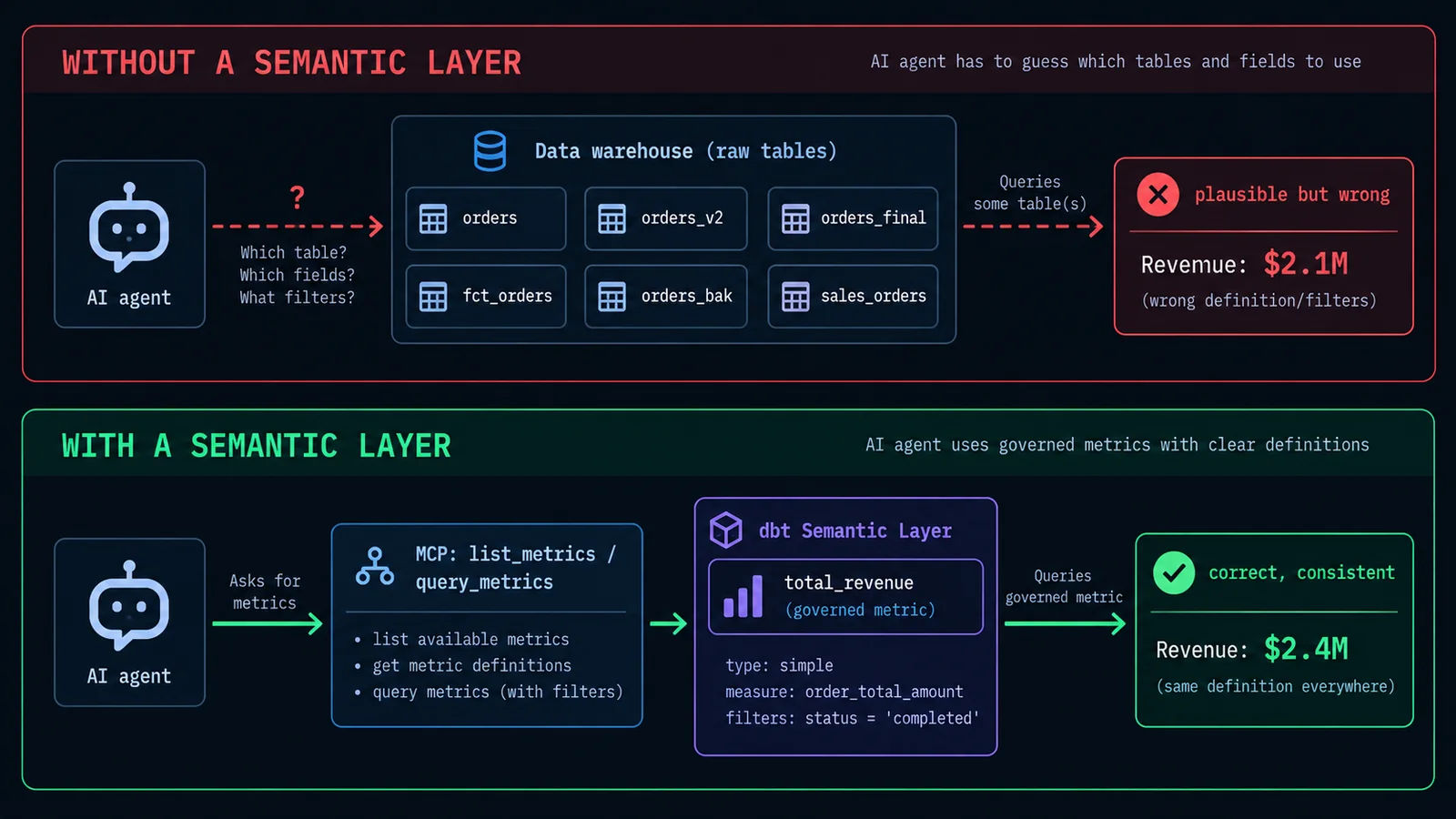
It's worth being precise about the limits of this, because it's not a total solution and shouldn't be sold as one. A semantic layer only protects the queries that go through it. An AI agent — or a human, for that matter — that bypasses the semantic layer and writes raw SQL directly against the warehouse for a question the semantic layer doesn't yet cover gets none of these guarantees, and the more capable AI agents become at writing raw SQL on the fly, the more tempting that bypass becomes for anything the governed metric catalog hasn't gotten around to covering yet. The semantic layer is only as good as its coverage: if "customer lifetime value" isn't yet defined as a metric, an AI agent asked about customer lifetime value will either say it can't answer, or — more worryingly, if it's been given raw table access as a fallback — go compute its own version of it against the raw tables, quietly reintroducing exactly the guessing problem the semantic layer exists to prevent. Rolling this out well means being deliberate about which metrics matter enough to formally define, keeping that catalog genuinely current as the business changes, and being honest with AI tooling (and with the people using it) about the difference between "this number came from a governed metric" and "this number came from a model improvising against raw tables," because those are two very different confidence levels wearing the same plausible, well-formatted output.
Implementation Considerations and Migration Path
Adopting a semantic layer isn't a weekend project, and it's worth being honest about the sequencing rather than pretending it's a drop-in feature flag. The layer only produces trustworthy metrics if the models underneath it are already trustworthy, which means the real prerequisite work is usually already-familiar dbt hygiene rather than anything specific to MetricFlow: clean, well-tested mart-layer models with sensible grain, consistent naming, and enough test coverage that you actually trust the numbers a metric would be built from before you formalize them into a governed definition. If your mart models aren't there yet, that's the actual first project — the semantic layer YAML on top of a shaky model is just a more official-looking way of being wrong.
A sensible migration path starts narrow, not comprehensive. Pick a small number of metrics that are already a known, recurring source of disagreement — revenue is almost always one of them — and formally define just those, end to end, before trying to migrate an entire metric catalog at once. This does two useful things: it forces you to actually resolve the underlying definitional disagreement once, in writing, with whoever owns that business logic (finance, usually, for anything revenue-adjacent), and it gives the rest of the organization a small, concrete example of what "ask the semantic layer instead of writing your own SQL" actually looks like day to day, which is a much easier thing to get buy-in for than a slide describing the concept abstractly.
Materialization strategy for the underlying dbt models matters more here than it might for a model nobody's querying interactively. A semantic layer query that has to build the equivalent of a wide, expensive join across several large view-materialized models on every single request is going to be slow enough that BI users notice and route around it, which defeats the entire point. Getting the materialization choice right for your semantic-layer-facing mart models — table versus incremental, and when each makes sense — is exactly the territory covered in this site's piece on dbt materialization strategies, and it's worth revisiting that decision specifically for any model that's about to become the foundation of a widely-queried metric, since the performance bar for "table an analyst glances at occasionally" and "table MetricFlow hits on every BI dashboard refresh" are genuinely different.
Ownership and review process deserve explicit thought before the first metric ships, not after the second disagreement about one. Because a metric definition is, in effect, an encoded business decision — does revenue include tax, does churn count a downgrade, does "active" mean 30 days or 90 — the pull request that adds or changes a metric should route to whoever actually owns that business definition, the same way a schema change routes to whoever owns the underlying data. Treating metric changes with less rigor than model changes, just because the YAML is shorter, is a fast way to reintroduce the exact drift a semantic layer exists to eliminate, just one layer further downstream, with an extra veneer of "official" credibility that makes the wrong number harder to challenge once it's out there.
Finally, plan for the deployment lag explicitly. Because production semantic layer queries depend on a dbt job having successfully run and deployed the current metric definitions — as covered in the querying section above — a metric change sitting merged in Git isn't live until that job runs. For a team used to dbt models refreshing on a predictable schedule this isn't a new problem exactly, but it's worth spelling out to non-technical stakeholders who might reasonably assume a metric definition change takes effect the moment it's approved, the same way they'd assume a formula edit in a spreadsheet takes effect immediately.
Common Pitfalls
Building the semantic layer on unstable mart models. A metric is only as reliable as the dbt model feeding its measures. Formalizing a metric definition on top of a model that's still churning, poorly tested, or ambiguous about its own grain just moves the disagreement one layer up and makes it look more authoritative than it actually is.
Trying to migrate the entire metric catalog on day one. Starting with dozens of metrics at once means dozens of unresolved definitional debates happening simultaneously, with no working example yet to point to. Start with two or three metrics that are already a known source of disagreement, ship those correctly, and expand from a proven pattern.
Confusing a rolling window with a grain-to-date reset. A trailing-30-day cumulative metric and a metric that resets at the start of each month are genuinely different numbers that happen to look similar in a chart. Picking the wrong window versus grain_to_date parameter produces a metric that's subtly, persistently wrong in a way that's hard to catch by eyeballing a dashboard.
Letting metric YAML changes skip the review rigor of model changes. A metric definition is an encoded business decision, not boilerplate configuration. Route metric pull requests to whoever actually owns the underlying business logic, the same way a schema or model change routes to whoever owns that data — a two-line YAML diff can change what "revenue" means for the whole company.
Assuming AI agents are automatically safe just because a semantic layer exists. A semantic layer only governs the queries that actually go through it. An AI agent (or a person) that falls back to raw warehouse access for anything the metric catalog doesn't yet cover gets none of the guarantees discussed above — coverage gaps quietly reintroduce the exact guessing problem the layer exists to prevent.
Ignoring materialization performance until BI users complain. A semantic layer query that has to join several view-materialized models live, on every request, will be slow enough that people quietly route around it and go back to writing their own SQL. Get the underlying model materialization right before the layer goes live broadly, not after adoption has already stalled.
Forgetting that a merged metric change isn't a deployed one. Production semantic layer queries run against whatever the last successful dbt job deployed, not against whatever's merged to your main branch. Communicate that lag explicitly to stakeholders who reasonably expect an approved definition change to take effect immediately.
Wrapping Up
The underlying idea here is genuinely simple, even if the YAML and the acronyms make it look complicated from the outside: decide what "revenue" means exactly once, write that decision down somewhere version-controlled and reviewable, and make every tool that needs revenue — a dashboard, a spreadsheet, a Python notebook, an AI agent answering a question in Slack — ask that one place for the answer instead of reconstructing its own guess from raw tables. Everything else in this article — semantic models, entities, dimensions, measures, the five metric types, the JDBC and GraphQL APIs, the MCP tools — is infrastructure built in service of that one simple idea, and it's worth not losing sight of the idea itself underneath the implementation detail.
What's changed the calculus recently isn't the core concept, which is decades old, but who's asking. A human analyst writing a slightly wrong query at least has some chance of noticing the number looks off before it reaches a dashboard. An AI agent generating a query on demand, at volume, with total confidence and no innate sense of when a number looks suspicious, doesn't have that instinct — which is exactly why the case for a governed metrics layer is stronger now than it's ever been, not weaker. The more decisions get made off numbers an AI helped surface, the more that number needs to be coming from somewhere with exactly one definition, reviewed by someone who actually understands the business, rather than freshly reconstructed, plausibly, every single time someone asks.
— If your team has gone through a semantic layer migration, I'd like to hear what actually broke along the way versus what the documentation implied would break. Drop a comment; real rollout stories are more useful than another quickstart guide.
One email, every other week.
New posts on data engineering, applied AI, and the business decisions around them. No noise, unsubscribe anytime.
Comments
All comments are reviewed before they appear publicly — this keeps spam out.
Loading comments…