Snowflake vs. BigQuery vs. Redshift: Choosing a Cloud Data Warehouse in 2026
Three different architectures for the same core promise — storage and compute separated at scale. Here's how they actually differ in pricing shape, performance behavior, and day-to-day operating cost.
What This Choice Is Actually About
Every vendor pitch for Snowflake, BigQuery, and Redshift eventually converges on the same sentence: storage and compute are separated, so you scale each independently and only pay for what you use. That sentence is true of all three, and it is also almost useless for actually choosing between them, because it describes the one thing they have in common rather than the several things they don't. Ten years into working with all three of these platforms across teams of very different shapes — a five-person startup analytics team, a 200-person enterprise data org, a handful of consultancies bouncing between clients on whatever the client already had — the pattern I keep seeing is teams picking a warehouse based on which one a blog post called "the best," then spending the next eighteen months discovering the specific ways their choice doesn't fit their actual workload, team, or billing tolerance.
All three platforms can, in the narrow technical sense, "run SQL at scale." Give any of them a few terabytes of reasonably modeled data and a BI tool pointed at it, and all three will answer most analytical queries in a few seconds. If raw query capability were the differentiator, this article would be three paragraphs long. It isn't, because the differences that actually matter show up somewhere else entirely: in how you pay for compute, in what happens when forty analysts hit the same warehouse at 9am on a Monday, in how much operational babysitting the platform expects from your team, and in how painful it is to walk away if you picked wrong.
This article treats the comparison as fundamentally operational rather than theoretical. We'll walk through how each platform actually implements the storage/compute split, what a bill from each one is shaped like (not just what the sticker price is — pricing pages change constantly, and any dollar figure quoted here should be treated as a snapshot that needs re-verification against current vendor pricing before you rely on it), how each one behaves under real concurrent load, how well each fits into a modern dbt-centric analytics engineering stack, and what it actually costs — in engineering time, not just dollars — to move off one and onto another. The goal isn't to crown a winner. It's to give you enough of the operational reality that when someone on your team says "let's just use Snowflake, everyone uses Snowflake," you have a specific, informed answer for why that's right or wrong for your situation.
One framing that's worth holding onto throughout: Snowflake, BigQuery, and Redshift each grew out of a different starting assumption about who the platform is for. Snowflake was built from day one as a dedicated, cloud-native warehouse company with no pre-existing infrastructure to protect — it could design the ideal architecture with a blank sheet. BigQuery grew directly out of Google's internal Dremel query engine, built to answer ad-hoc analytical queries at Google's internal scale, then productized for external customers with billing to match that heritage. Redshift began as a fork of ParAccel's MPP database, retrofitted onto AWS infrastructure and deeply wired into the rest of the AWS ecosystem from the start. Those origins still show up today in each platform's defaults, its rough edges, and the kind of team it fits best.
Architecture Compared: Storage/Compute Separation, Implemented Three Different Ways
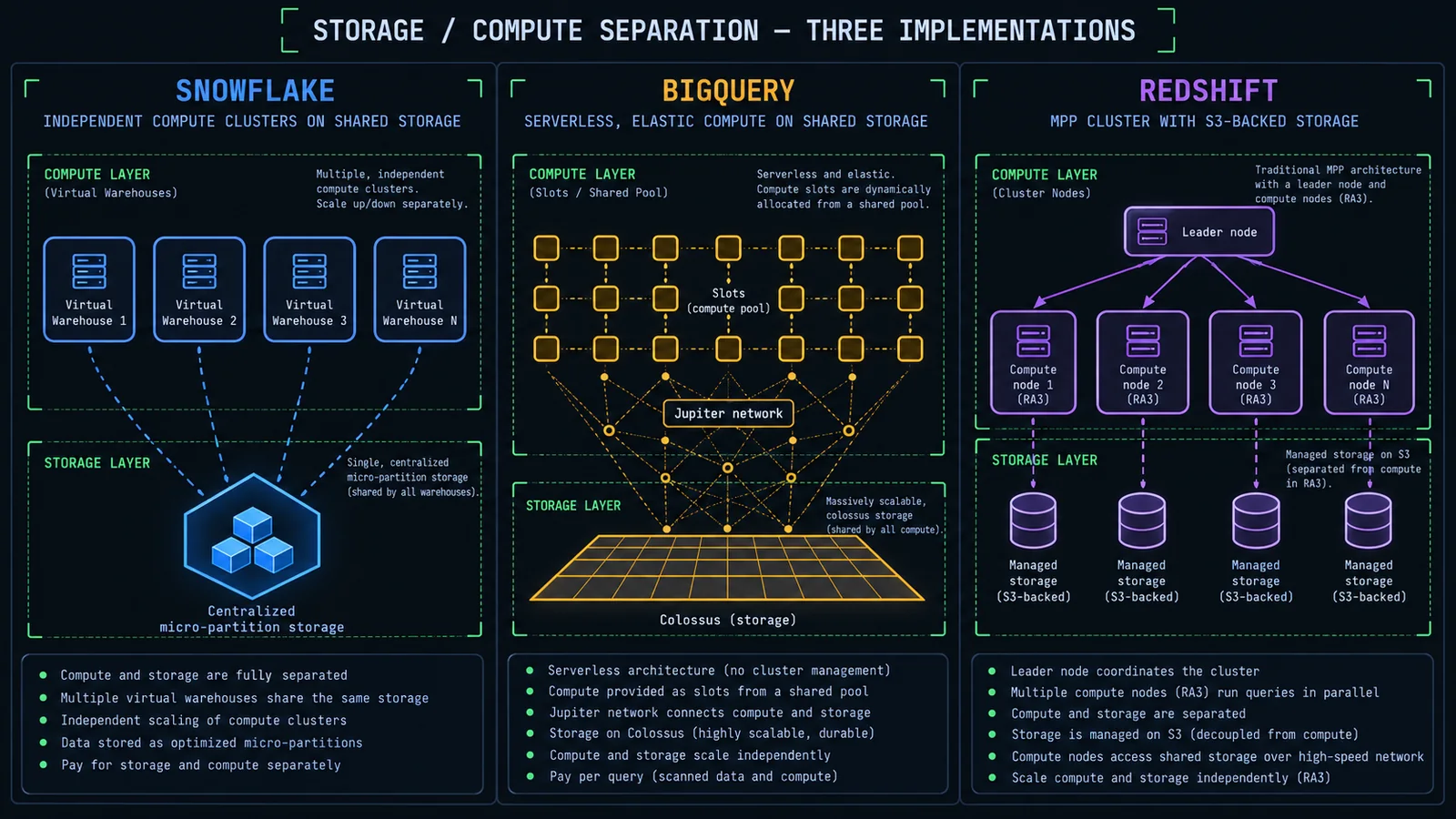
"Storage and compute are separated" is the marketing headline for all three platforms, but the actual mechanics behind that separation differ enough that they produce genuinely different operational behavior — different scaling granularity, different concurrency ceilings, different failure modes. It's worth walking through each implementation on its own before getting into pricing, because the architecture is what the pricing model is built on top of, not the other way around.
Snowflake — Shared Storage, Independent Virtual Warehouses
Snowflake stores all data in a single logical storage layer, split internally into immutable micro-partitions sitting on cloud object storage (S3, Azure Blob, or GCS depending on which cloud you deploy Snowflake into). Compute is provided by virtual warehouses — independently sized, independently started and stopped clusters of compute that all read from and write to that same shared storage layer. Because storage is logically one thing and compute is many independent, disposable clusters, you can spin up a warehouse dedicated to your ETL jobs, a separate warehouse for your BI dashboards, and a separate warehouse for a single analyst running ad hoc exploration — all against the exact same underlying tables, with zero risk of one workload starving another of compute, because they're running on physically separate clusters. This is the architectural basis for Snowflake's signature pitch of workload isolation without data duplication.
Each virtual warehouse is billed while it's running and can be configured to auto-suspend after a period of inactivity and auto-resume the instant a new query arrives, which is what makes the "pay only for compute you use" story actually hold up in practice rather than being an asterisk.
BigQuery — Fully Serverless, No Clusters to Manage at All
BigQuery takes the separation a step further and removes the concept of a cluster from the user's mental model entirely. Storage lives in Google's Colossus distributed file system; query execution runs on Dremel, Google's massively parallel query engine, connected to storage over Google's internal Jupiter network fabric. You never provision a warehouse, never pick an instance type, and never explicitly start or stop compute — you submit a query, and BigQuery allocates the compute resources (measured in "slots," which are units of query-processing capacity) needed to run it, then releases them when the query finishes. There's genuinely no cluster to size, resize, or forget to pause.
This is architecturally the most abstracted of the three — you interact with almost none of the underlying machinery — and it's also the one place where "serverless" is not a marketing exaggeration; it's a fair description of the actual operating model.
Redshift — MPP Clusters with a Leader Node, Now Serverless Too
Redshift's roots are the most traditional of the three, and it still shows. A provisioned Redshift cluster has a dedicated leader node that parses SQL, builds the query plan, and coordinates execution, plus one or more compute nodes that actually execute the work, each internally divided into "slices" for parallelism. With the older DC2 node family (now end-of-life as of an April 2026 AWS deprecation, so not something to design around going forward), compute and storage were tightly coupled to the node itself. RA3 nodes, which are now the standard for provisioned Redshift, decouple that: frequently accessed data sits on fast local SSD cache, while the bulk of data lives in Redshift Managed Storage backed by S3, letting you scale compute (add or resize nodes) without being forced to also scale storage in lockstep, and vice versa.
Redshift Serverless, layered on top of the same underlying engine, removes node management the way BigQuery removes cluster management — you provision a base capacity measured in RPUs (Redshift Processing Units) and the service scales compute up and down automatically within configured bounds, without you managing individual nodes at all.
The practical upshot: Snowflake's model gives you the most granular manual control over workload isolation — you decide exactly how many independent compute clusters exist and what each one is sized for. BigQuery's model gives you the least to manage and the most implicit elasticity, at the cost of less direct control over exactly how compute gets allocated to a given query. Redshift sits architecturally in between, and — notably — is the only one of the three where you can still choose a fully provisioned, dedicated-hardware model if that's genuinely what your workload needs, rather than being pushed entirely toward a shared, multi-tenant compute pool.
This matters for a decision that's easy to skip past: if your organization already has a strong opinion about warehouse vs. lake vs. lakehouse architecture, that opinion should inform this choice too. All three platforms here are, fundamentally, warehouses — but the degree to which each one plays well with an open lakehouse layer underneath it (Iceberg tables, in particular) varies, and we'll come back to that in the ecosystem section, because in 2026 it's a real differentiator rather than a footnote.
Snowflake: Architecture, Pricing, Strengths, Weaknesses
Snowflake is, by design, a single product experience layered over multiple cloud providers — you can run Snowflake on AWS, Azure, or GCP, and the SQL surface, feature set, and operating model stay largely the same regardless of which cloud sits underneath. That cloud-agnosticism is itself a meaningful differentiator: it's the one of the three warehouses here that isn't tied to a single hyperscaler's ecosystem by default.
Architecture, in practice
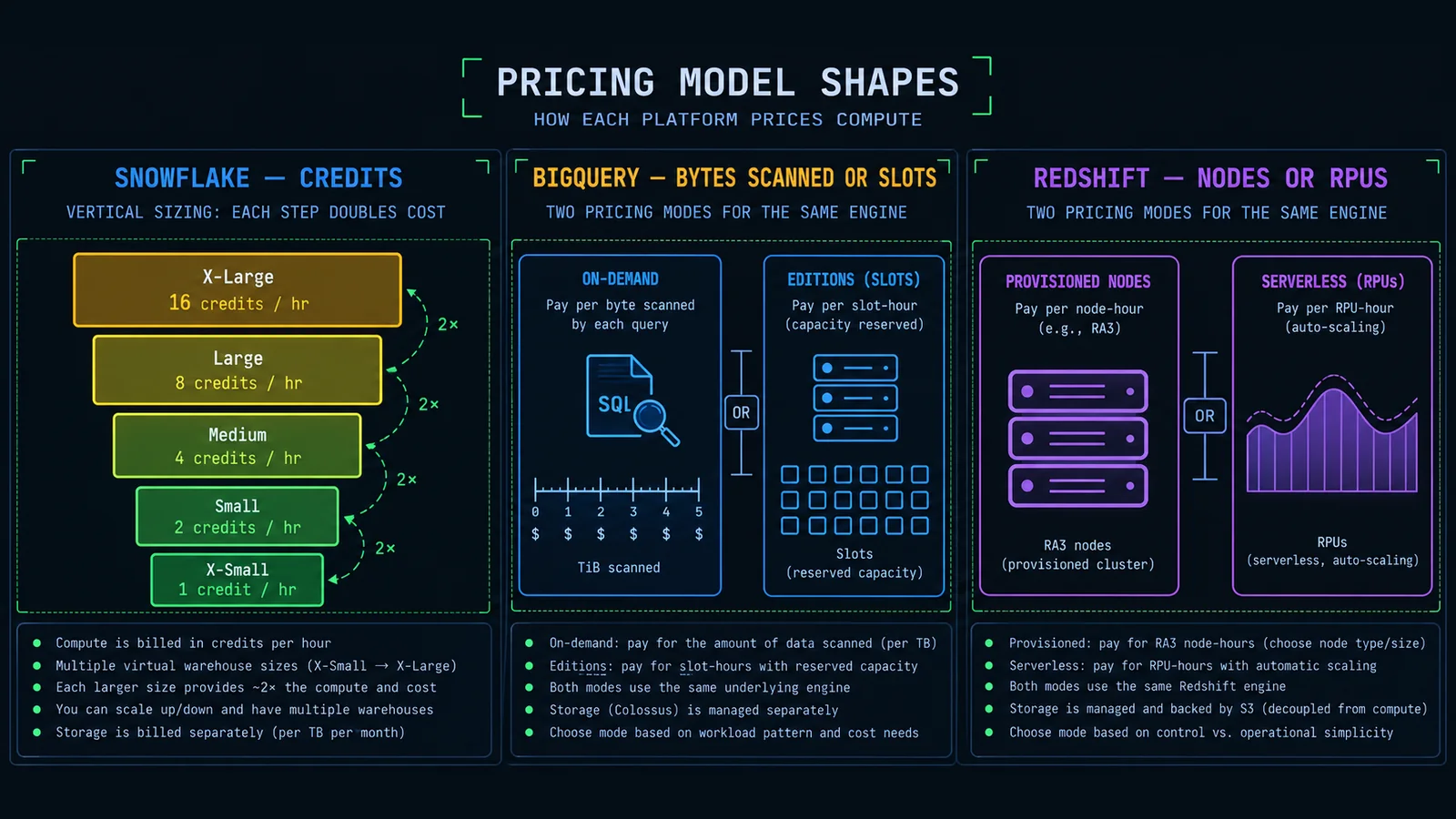
Everything in Snowflake runs through a virtual warehouse — you cannot run a query without one active or auto-resuming to serve it. Warehouses come in T-shirt sizes, X-Small through 6X-Large, and each size step doubles both the compute power available and the credits consumed per hour. An X-Small warehouse burns roughly 1 credit per hour it's active; a Small burns roughly 2; a Medium roughly 4; and so on up the ladder to the largest sizes burning several hundred credits an hour. Because credits accrue per second while a warehouse is running (not per query), the discipline that actually controls your bill is aggressive auto-suspend settings and right-sizing warehouses to the workload, not query-level optimization alone — though query optimization still matters enormously, since a badly written query on an oversized warehouse burns credits just as fast as a well-written one, just for longer than it needs to.
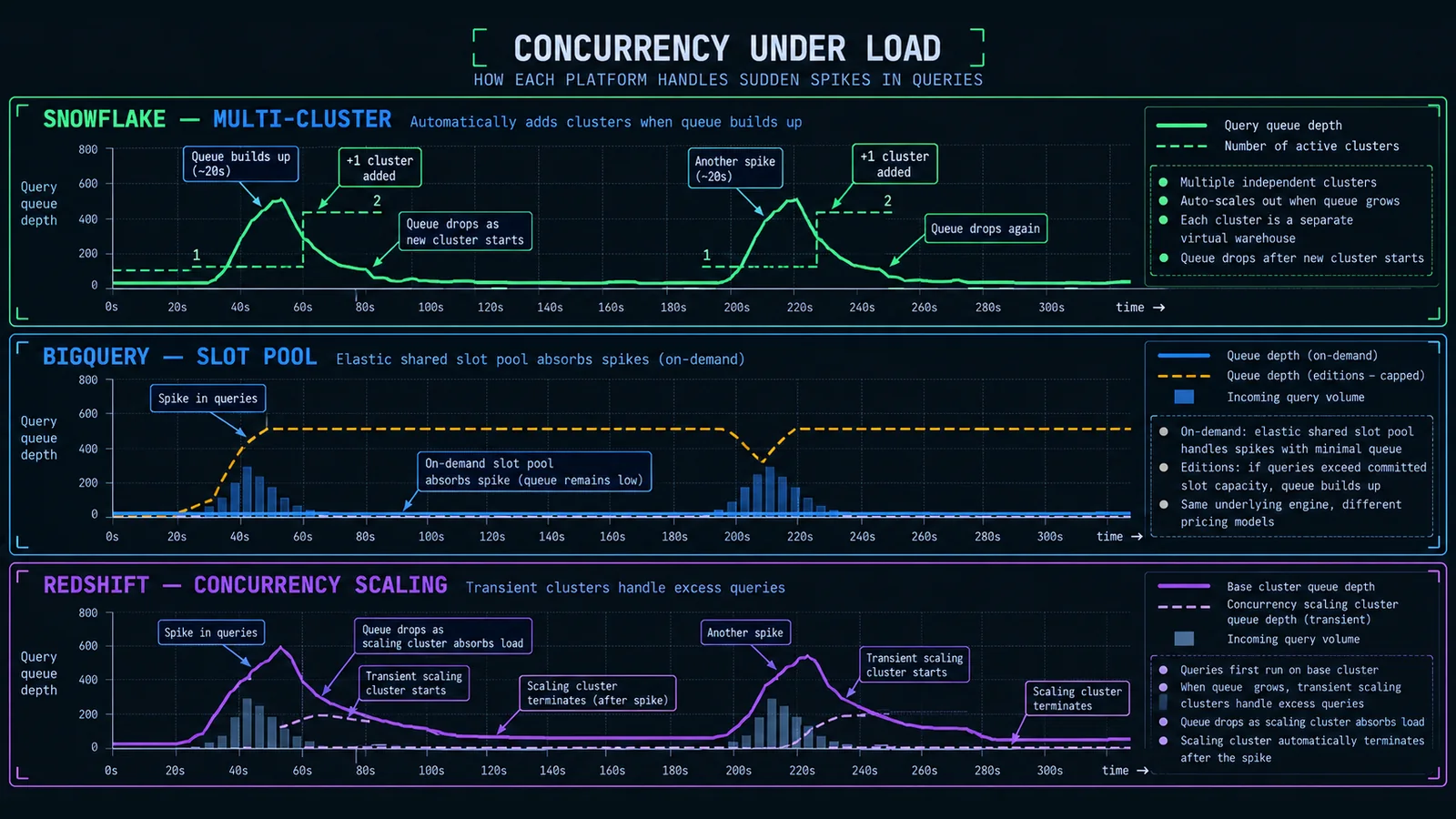
For concurrency, Snowflake's answer is multi-cluster warehouses: instead of resizing a single warehouse up and down to absorb more simultaneous queries, you let Snowflake automatically spin up additional identically-sized clusters behind the same warehouse name as queuing starts, and spin them back down as load drops. Two scaling policies control how eager that is — Standard starts a new cluster after roughly 20 seconds of sustained query queuing and biases toward keeping queries fast; Economy waits considerably longer, around 6 minutes, and biases toward not spinning up compute you might not need. That's a real, consequential trade-off between latency and cost that most teams set once at setup and never revisit, which is itself worth flagging as a mistake — it's worth periodically checking which policy your production warehouses are actually running under.
Snowpark, Snowflake's framework for running Python, Java, and Scala workloads directly against warehouse compute (rather than exporting data out to a separate compute environment), has matured into a genuinely credible option for teams that want to do feature engineering or light ML work without standing up a separate Spark cluster — though it runs on the same credit-metered virtual warehouses as SQL, so its cost model isn't a separate thing to reason about, it's the same warehouse billing you're already managing.
CREATE WAREHOUSE IF NOT EXISTS analytics_wh
  WAREHOUSE_SIZE = 'MEDIUM'
  AUTO_SUSPEND = 60          -- seconds idle before suspending
  AUTO_RESUME = TRUE
  MIN_CLUSTER_COUNT = 1
  MAX_CLUSTER_COUNT = 4
  SCALING_POLICY = 'STANDARD';
Pricing, in shape
Snowflake's pricing has three separate meters that don't move together, and understanding that they're separate is half of understanding the bill. Compute is billed in credits, consumed per second while a warehouse runs, and the dollar cost per credit depends on which edition you're on — Standard, Enterprise, or Business Critical — plus the cloud region and whether you're buying on-demand or under a pre-purchased capacity contract. A recent search of vendor and analyst pricing puts on-demand US credit pricing roughly in the $2-to-$4 range across those editions, with non-US regions typically running meaningfully higher and multi-year capacity commitments typically discounting the effective rate — treat those specific figures as a snapshot to re-verify, not a number to build a budget on directly. Storage is billed separately, per compressed terabyte per month, and is decoupled entirely from compute — data can sit in Snowflake accruing storage cost with zero active warehouses running against it. Cloud services, the layer that handles things like query parsing, optimization, and metadata management, is free up to roughly 10% of your daily compute credit consumption, and only becomes a separate line item if you exceed that threshold, which most teams don't unless something's misconfigured.
Editions matter beyond just the credit rate. Enterprise adds multi-cluster warehouses in auto-scale mode, longer Time Travel retention (extendable well past the Standard edition's one-day default, up to a documented maximum), and column-level security — features that are genuinely operationally relevant, not just compliance checkboxes, which is why most teams doing anything beyond a small proof of concept end up on Enterprise rather than Standard.
what it's actually good at
Workload isolation without data duplication is Snowflake's single strongest architectural argument — the ability to give your ETL pipeline, your BI tool, and a data science notebook each their own dedicated compute against one shared copy of the data, with one workload's load spike never degrading another's query latency, is genuinely hard to replicate cleanly on the other two platforms without more manual work. Snowflake also has the most mature and predictable semi-structured data handling of the three for teams that need to query JSON or Parquet-shaped data alongside relational tables in the same SQL statements, and its cross-cloud portability is a real hedge against vendor lock-in at the infrastructure layer, even though you're still committing to Snowflake itself as a platform.
where it gets expensive or awkward
The most common Snowflake cost mistake, by a wide margin, is oversized warehouses left running past when the workload actually needs them — because compute is billed per second regardless of whether the warehouse is doing useful work, an XL warehouse idling for twenty extra minutes because auto-suspend was set too generously is real, avoidable money, every day, forever, until someone notices. Multi-cluster auto-scaling under Standard policy can also produce bill spikes during genuine concurrency surges that are hard to predict in advance, and because compute is decoupled from specific workloads by default, cost attribution across teams requires deliberate tagging and warehouse segregation — it doesn't happen automatically just because you're using the platform.
BigQuery: Architecture, Pricing, Strengths, Weaknesses
BigQuery's defining trait is how little of it you have to actively manage. There's no cluster to size, no warehouse to start or stop, no node type to pick — which is either the most attractive thing about it or the most disorienting, depending on how much you like having explicit dials to turn.
Architecture, in practice
Storage lives in Colossus, Google's distributed storage system, stored in a columnar format (Capacitor) that's efficient for the kind of scan-heavy analytical queries BigQuery is built around. Query execution runs on Dremel, which breaks a query into a tree of execution stages and fans work out across thousands of "slots" — BigQuery's unit of query-processing capacity, roughly analogous to a virtual CPU dedicated to query execution — connected to storage over Google's very fast internal Jupiter network. Because storage and compute are physically as well as logically separate, and because the slot pool BigQuery draws from is enormous and shared across (isolated) tenants, BigQuery can burst a single large query across a very large number of slots for a short burst, then release them the instant the query completes — there's no "warehouse" sized in advance to be either too small or sitting idle.
BI Engine, a separate in-memory analysis layer BigQuery offers, caches frequently queried data to accelerate dashboard-style workloads and sub-second interactive queries, which matters specifically for teams pointing a BI tool directly at BigQuery rather than materializing results into a smaller serving layer first.
Pricing, in shape
This is where BigQuery genuinely diverges from the other two, and it's the single most important thing to understand before committing to it. BigQuery offers two fundamentally different pricing models, not just different tiers of the same model. On-demand pricing charges per amount of data scanned by a query — priced per tebibyte, with a modest free monthly allowance per project — meaning your bill is a direct function of how much data each query has to read, completely independent of how long the query takes or how complex it is. A well-partitioned, well-clustered table that lets a query skip scanning 95% of the underlying data costs a fraction of what the same logical query costs against an unpartitioned table, even though both return the same result. BigQuery Editions (Standard, Enterprise, Enterprise Plus) is the alternative: capacity-based pricing where you purchase slots by the hour instead, with autoscaling within each edition and multi-year commitment discounts available for predictable workloads.
The practical decision between the two models comes down to a break-even calculation on committed slot capacity versus expected bytes scanned — recent pricing research puts that crossover somewhere in the neighborhood of 100 sustained Enterprise-edition slots being roughly equivalent to several hundred TiB of on-demand scanning per month, though the exact crossover point depends heavily on your specific edition, commitment length, and region, and should be modeled against your own query patterns rather than taken as a fixed rule. The honest framing: on-demand is the simplest model to reason about for spiky, unpredictable, low-to-moderate volume workloads, and it punishes badly written queries directly and immediately — scan a huge unpartitioned table by accident and you feel it on the very next bill. Editions capacity pricing suits large, sustained, predictable workloads where you'd rather pay a flat, budgetable rate than have costs swing with query volume, at the cost of a capacity bill that runs whether you're using the slots or not, and — for multi-year commitments — a lock-in period that on-demand simply doesn't have.
-- dry_run in the BigQuery client/console shows bytes processed
-- without actually executing or billing for the query
SELECT customer_id, SUM(order_total) AS lifetime_value
FROM `project.analytics.fct_orders`
WHERE order_date >= '2026-01-01'
GROUP BY customer_id;
-- bq query --dry_run --use_legacy_sql=false "..."
what it's actually good at
Zero infrastructure management is not an exaggeration here — there's genuinely nothing to size or tune at the compute layer to get started, which makes BigQuery an unusually good fit for small teams or teams without dedicated platform engineers who'd otherwise be babysitting warehouse configuration. It also scales to extremely large, bursty analytical workloads with no manual intervention, and its native integration with the rest of Google Cloud — particularly for teams already running workloads on GCP, using Google Analytics 4 data, or doing anything adjacent to Vertex AI — removes a lot of plumbing that would otherwise be custom-built.
where it gets expensive or awkward
On-demand pricing is genuinely unforgiving of unpartitioned tables and exploratory SELECT * habits — a query pattern that would just be "a bit slow" on a fixed-cost provisioned cluster is directly, immediately expensive on BigQuery on-demand, because you're billed for bytes scanned regardless of whether the query needed all of them. This makes query discipline and deliberate table partitioning/clustering less of a performance nicety and more of a direct cost control, in a way that's more front-of-mind on BigQuery than on the other two platforms. Cost predictability is also a real challenge on-demand at scale — a single bad query from an analyst who forgot a WHERE clause can produce a startling line item, whereas a Snowflake warehouse or Redshift cluster has a hard ceiling on hourly burn rate no matter how badly a query is written.
Redshift: Architecture, Pricing, Strengths, Weaknesses
Redshift is the platform most explicitly built for teams already deep in AWS, and it shows in both its strengths and its rough edges — it's the most "infrastructure you configure" of the three, with the option to go fully serverless if you'd rather not.
Architecture, in practice
A provisioned Redshift cluster has a leader node coordinating query planning and a set of compute nodes doing the actual execution, each internally sliced for parallelism — this is a fairly classic MPP (massively parallel processing) design, and if you've worked with Teradata or similar on-prem MPP systems before, the mental model transfers directly. The node type that matters today is RA3, which decouples compute from storage by keeping hot data cached locally on fast SSDs while the bulk of the data lives in Redshift Managed Storage, backed by S3 — this is what lets you resize compute without being forced to also resize how much data the cluster can hold, closing most of the gap with Snowflake's and BigQuery's cleaner separation. The older DC2 node family, which tied storage directly to local instance disk with no independent scaling, reached AWS end-of-life status in April 2026, so any Redshift deployment planning going forward should assume RA3 (or the newer, smaller RA3.large variant introduced in 2024 for lighter workloads) as the baseline, not DC2.
Concurrency scaling is Redshift's answer to sudden query volume spikes on a provisioned cluster: rather than resizing the base cluster, Redshift can automatically spin up additional transient clusters to absorb overflow query load during bursts, then tear them back down, billed separately from base cluster time. Redshift Serverless goes further and removes the concept of a fixed cluster entirely — you set a base and max RPU (Redshift Processing Unit) capacity, and the service scales compute within that range automatically, including scaling down to zero and pausing billing entirely during genuine inactivity, similar in spirit to Snowflake's auto-suspend but managed at a finer, automatic granularity rather than a warehouse-level on/off switch.
aws redshift-serverless update-workgroup \
  --workgroup-name analytics-wg \
  --base-capacity 32 \
  --max-capacity 256
Pricing, in shape
Provisioned Redshift bills per node-hour, at a rate that depends on the node type and size — recent pricing research put on-demand RA3 rates roughly in the range of $1 to $13 per hour depending on node size, with 1-year or 3-year reserved instance commitments cutting that by roughly a third to over half, which matters enormously for a 24/7 production cluster that's never actually idle. Managed storage is billed separately, per GB per month, at a rate that's the same whether you're on provisioned or serverless. Redshift Serverless bills per RPU-hour instead — recent research puts that rate in the neighborhood of $0.36 to $0.375 per RPU-hour in a typical US region — with compute billing only while queries are actively running and no charge during genuine idle periods, similar in spirit to how BigQuery on-demand only bills for active query work, just metered on compute-time rather than bytes scanned.
The honest crossover point, per the same research: for workloads that are active less than roughly 6 to 8 hours a day, or that have genuinely intermittent, spiky usage patterns, serverless tends to come out cheaper. For a workload that's realistically running close to 24/7 — a large always-on production BI layer serving dashboards around the clock — provisioned RA3 with a 1- or 3-year reserved commitment is very often 40-70% cheaper than the equivalent serverless spend, because you're trading serverless's per-second elasticity for a much lower committed rate on capacity you were going to use anyway. This is a genuinely different trade-off shape than Snowflake's or BigQuery's on-demand-vs-committed choices, because the "always-on" case tips clearly toward the older, more manually-managed model rather than toward the newer serverless one — worth internalizing before defaulting to serverless just because it's newer and requires less setup.
what it's actually good at
Deep AWS integration is Redshift's clearest advantage for a team already living in that ecosystem — native, low-friction connectivity to S3, Glue, Lake Formation, IAM-based access control, and the rest of the AWS data stack, without the cross-cloud plumbing a non-AWS-native warehouse would require. Provisioned Redshift with reserved instances also gives you the most predictable, budgetable cost of any option covered here for a genuinely steady, always-on workload — you know your monthly bill with more certainty than either Snowflake's variable credit consumption or BigQuery's variable bytes-scanned or slot-hour billing tends to offer. And because it's the most "traditional MPP" of the three, teams with existing Teradata, Netezza, or on-prem MPP experience often find the underlying mental model — leader node, compute nodes, distribution keys, sort keys — the most familiar to reason about.
where it gets expensive or awkward
Provisioned Redshift asks more of your team operationally than the other two: choosing sensible distribution keys and sort keys for large fact tables still meaningfully affects query performance in a way that requires actual tuning knowledge, not just "throw more compute at it," and getting those choices wrong on a large table is a real, recurring source of slow queries that isn't self-healing the way it more often is on Snowflake or BigQuery. Reserved instance commitments, while they save real money, also lock you into a specific capacity for one to three years — a poor fit for a workload whose shape is still genuinely uncertain. And while Serverless closes much of the operational gap with the other two platforms, it's the newest of the three serverless offerings covered here and has historically had a smaller surface of tuning options and edge-case documentation than the mature provisioned product it sits alongside.
Pricing Models Compared, Side by Side
Zooming back out from the platform-specific detail: the three pricing models aren't minor variations on a theme, they're structurally different bets about what you're most willing to have vary — your bill with usage, your bill with data volume, or your bill with time.
| Dimension | Snowflake | BigQuery | Redshift |
|---|---|---|---|
| Primary unit billed | Credits (compute-time, per second) | Bytes scanned, or slot-hours (Editions) | Node-hours (provisioned), or RPU-hours (serverless) |
| What drives cost most directly | How long compute runs, and at what warehouse size | How much data a query reads (on-demand) or committed slot capacity (Editions) | How long a cluster/workgroup runs, and at what capacity |
| Storage billing | Separate, per compressed TB/month | Separate, active vs. long-term storage tiers | Separate (managed storage), same rate across provisioned/serverless |
| Idle-time behavior | Auto-suspend stops compute billing | No idle billing on-demand; Editions capacity bills regardless of use | Serverless scales to zero; provisioned bills continuously unless paused manually |
| Cost predictability | Moderate — depends on warehouse discipline | Low on-demand, high on committed Editions | High on reserved provisioned, moderate on serverless |
| Punishes worst directly | Oversized warehouses left running | Unpartitioned tables, broad scans | Poor distribution/sort keys, over-provisioned clusters |
| Best-fit usage pattern | Mixed workloads needing isolation | Spiky, ad hoc, unpredictable query volume | Steady, high-utilization, always-on workloads |
The framing that clarifies this best, in my experience explaining it to teams making the choice for the first time: Snowflake bills you for compute-time regardless of what that compute actually did, which puts the cost-control burden on warehouse sizing and suspend discipline. BigQuery on-demand bills you for data volume touched regardless of how long that took, which puts the burden on table design and query discipline. Redshift provisioned bills you for capacity reserved regardless of whether it's fully utilized, which puts the burden on right-sizing the cluster to genuine sustained demand, ideally backed by a reservation. None of these is objectively the fairer model — they're just different places to put the incentive to be careful, and which one suits you depends on which failure mode your team is more likely to actually avoid. A team full of disciplined SQL writers who always filter and partition correctly will do great on BigQuery on-demand. A team that tends to forget to shut things down will bleed money on Snowflake compute or an over-provisioned Redshift cluster faster than they'll bleed money on BigQuery bytes scanned.
It's also worth being honest that every number cited above and throughout this article — credit rates, per-TiB rates, RPU-hour rates, node-hour rates — is a snapshot from current research and vendor documentation, and cloud pricing pages change often enough that by the time you're reading this, some of it will be stale. Treat the shape of each model — what unit is billed, what triggers cost, what's decoupled from what — as the durable takeaway, and re-check exact figures against each vendor's current pricing page before building a budget around them.
Performance and Concurrency Handling Compared
Raw single-query performance across all three platforms, on comparably-sized, reasonably-modeled data, tends to land close enough together that benchmark wars between them say more about who funded the benchmark than about which platform you should pick. The performance question that actually matters in production is concurrency: what happens to query latency when forty people, three scheduled dbt jobs, and a BI tool's dashboard refresh all hit the warehouse in the same five-minute window.
Snowflake's answer is the most explicit and controllable of the three: multi-cluster warehouses spin up additional identically-sized compute clusters as queuing starts, meaning a concurrency spike gets absorbed by adding parallel clusters rather than making any individual query wait behind others on the same cluster. The trade-off is that this is reactive by default — under the Standard scaling policy there's a real, if short, delay (on the order of tens of seconds) before an additional cluster spins up and starts absorbing queued queries, so a genuinely sudden spike still produces a brief window of queuing before the extra capacity lands. Because different workloads can also simply be assigned to entirely separate warehouses in the first place — a dedicated ETL warehouse never has to be sized around anticipated BI dashboard concurrency at all — a lot of Snowflake concurrency planning in practice is about workload segregation before it's about scaling policy.
BigQuery's approach is the most implicit: because compute is drawn from a large, elastic, shared pool of slots rather than a fixed-size warehouse or cluster you provisioned, a large concurrent query load generally gets absorbed automatically, without you configuring anything — on-demand pricing in particular has effectively no user-visible capacity ceiling to plan around for typical workloads. The trade-off shows up specifically on Editions/capacity pricing, where your purchased slot commitment does become a real ceiling, and query queuing becomes visible once concurrent demand exceeds what you've committed to — at which point it behaves much more like a fixed-capacity system than the "just works" reputation on-demand earns it.
Redshift's concurrency scaling on provisioned clusters works similarly in spirit to Snowflake's multi-cluster model — additional transient clusters absorb overflow query volume during bursts — but it's historically been positioned as a burst-absorption mechanism rather than a primary scaling strategy, and it's billed separately from base cluster time, so leaning on it heavily as your default concurrency answer rather than right-sizing the base cluster can itself become a cost surprise. Redshift Serverless handles this more automatically, scaling compute within your configured RPU range as concurrent demand changes, closer in behavior to BigQuery's elasticity than to a fixed provisioned cluster's hard ceiling.
One more concurrency-adjacent point worth being explicit about: none of these three platforms make bad SQL fast. Multi-cluster warehouses, elastic slot pools, and concurrency scaling clusters all solve the problem of many queries running simultaneously — they do nothing to fix a single query that's slow because it's doing a full table scan against an unpartitioned or unclustered table, or joining without a sensible key, or materializing an intermediate result that should have been incremental. Horizontal scaling adds parallel capacity; it doesn't rewrite your query plan. If your team is fighting slow dashboards, the fix is very often modeling and query discipline before it's a warehouse-sizing or scaling-policy change — worth reading alongside a deeper look at SQL and dbt query optimization techniques if that's the actual bottleneck you're hitting.
Ecosystem and Tooling Fit
By 2026, all three platforms have first-class dbt adapters (dbt-snowflake, dbt-bigquery, dbt-redshift), and dbt's Semantic Layer (built on MetricFlow) explicitly supports all three with platform-specific SQL generation, meaning the "which warehouse works with dbt" question that used to have real caveats attached to it is now essentially moot — if your team has standardized on dbt as the transformation layer, all three warehouses are legitimate targets, and the choice of warehouse doesn't meaningfully constrain your ability to use dbt well. Where the platforms still diverge is in how naturally certain dbt patterns map onto their underlying engine — for instance, materialization strategy choices like incremental models with merge-based updates lean on each engine's native MERGE support slightly differently, and getting incremental models genuinely efficient (rather than just functionally correct) still benefits from understanding the specific engine underneath the dbt abstraction.
BI and visualization tool support is broad and roughly comparable across all three at this point — Looker, Tableau, Power BI, Mode, Hex, and open-source options like Apache Superset all connect natively to Snowflake, BigQuery, and Redshift, so BI connectivity is rarely the deciding factor it might have been a few years ago. The more interesting convergence in 2026 is around open table formats: all three platforms now support Apache Iceberg in some form — Snowflake through native Iceberg table support and its involvement in the open Apache Polaris catalog project, BigQuery through BigLake's Iceberg support (including cross-engine reads on data sitting in GCS), and Redshift through Iceberg support via AWS Glue and Athena integration. That convergence genuinely matters for the build-vs-lock-in calculus: increasingly, it's possible to keep the actual data in an open Iceberg format and point more than one of these engines at the same underlying files, which softens — though doesn't eliminate — the cost of a warehouse choice turning out to be wrong later. It's not full interoperability yet; each platform still has its own opinions about catalog integration, table maintenance, and performance against Iceberg versus its native table format, but the direction of travel is clearly toward less absolute lock-in at the storage layer than existed even two or three years ago.
Ecosystem gravity outside of dbt and BI tools is real and worth naming directly: a team already deep in Google Cloud — using GA4, Vertex AI, or Google Workspace data sources — will find BigQuery's native integrations genuinely reduce plumbing work. A team on AWS, using Glue, Lake Formation, or IAM-based access patterns elsewhere, gets the same benefit from Redshift. Snowflake's pitch is closer to "we deliberately don't play favorites" — its cross-cloud portability is a real advantage for organizations that are multi-cloud by policy or that want to avoid deepening dependence on a single hyperscaler, but it means you're integrating with whichever cloud's adjacent services on a case-by-case basis rather than getting the tightest-possible native integration any one cloud offers its own warehouse.
Cost Control Practices, Per Platform
Every platform here has a small number of practices that account for a disproportionate share of real-world cost overruns, and a corresponding small number of practices that reliably prevent them. None of this is exotic — it's mostly discipline that has to be set up once and then monitored, which is exactly why it tends to erode over time without someone actively owning it.
Snowflake
Set aggressive auto-suspend on every warehouse — 60 seconds is a reasonable default for most interactive and ETL warehouses, not the multi-minute defaults teams sometimes leave in place out of caution. Segment workloads onto separate, appropriately sized warehouses rather than one large shared warehouse for everything, so a heavy batch job never forces analysts onto an oversized (and therefore expensive) cluster just to keep their queries fast. Use resource monitors to set hard or soft credit-consumption thresholds per warehouse or account, with alerts before a runaway job or a forgotten always-on warehouse turns into a surprise bill. And periodically audit which scaling policy — Standard or Economy — each multi-cluster warehouse is actually running under; it's a setting that's easy to set once at initial setup and never revisit as workload patterns change.
BigQuery
Partition and cluster large tables deliberately, on the columns your queries actually filter and group by most often — this is the single highest-leverage cost control on BigQuery on-demand, because it directly reduces bytes scanned per query, which is the literal unit you're billed on. Use dry-run cost previews before running exploratory queries against large tables, so a mistaken SELECT * against an unpartitioned multi-terabyte table gets caught before it runs rather than after the bill arrives. Set per-project or per-user query cost quotas to put a ceiling on how much any single analyst or job can spend in a day. And model the on-demand-versus-Editions break-even honestly against your actual sustained query volume before committing to capacity pricing — it's the right call for large, steady workloads, and a real, multi-year-locked-in mistake for workloads that are still genuinely spiky or growing unpredictably.
Redshift
Get distribution keys and sort keys right on large fact tables — this isn't optional tuning the way it can feel like on the other two platforms; a poorly distributed large table produces genuinely slow queries that no amount of concurrency scaling fixes, because concurrency scaling adds parallel capacity, it doesn't fix a bad data layout. Right-size the base cluster or serverless workgroup to real sustained utilization rather than to a comfortable buffer "just in case" — over-provisioning is the most common Redshift cost mistake, mirroring Snowflake's oversized-warehouse problem but at the cluster level instead of the warehouse level. Reserve capacity for genuinely steady, always-on workloads once utilization patterns are well understood, since reserved instance discounts on provisioned RA3 are large enough to matter — but only commit once you're confident the workload's shape won't change meaningfully within the commitment window. And treat concurrency scaling clusters and Serverless auto-scaling as a safety valve for genuine bursts, not a substitute for correctly sizing the thing you actually run most of the time.
Across all three, the single most underused practice is simply estimating cost before committing to a schema or table design, rather than discovering the cost implications after data volume has already grown. If you're early in modeling a new dataset and trying to reason about how table size and row count will translate into storage cost and query cost across a candidate schema, a rough sizing pass with a tool like the table size estimator at tools.techedge.in is a useful sanity check before you've committed to a partitioning scheme you'll regret unwinding later.
Migration Considerations
Moving from one of these platforms to another is rarely the SQL-syntax-translation exercise it sounds like on paper — most of the real cost and risk lives elsewhere, in the parts of a migration that don't show up until you're already partway through it.
SQL dialect differences are real but usually the smallest part of the effort. Date/time function names, semi-structured data access syntax (Snowflake's VARIANT and dot-notation versus BigQuery's native JSON/STRUCT/ARRAY types versus Redshift's SUPER type), and window function edge cases all differ enough to require real rewriting, not just find-and-replace — but a mature dbt project with most logic expressed in relatively portable SQL, and minimal use of platform-specific stored procedures or UDFs, converts faster than teams usually expect going in.
Cost model retraining is bigger than the migration itself. A team that's spent two years developing intuition for "this warehouse size handles this workload" or "this query pattern is expensive on our platform" has to relearn those instincts from scratch on a new platform with a structurally different pricing model — the FinOps and cost-control muscle memory doesn't transfer, even when the SQL mostly does.
Downstream tooling and permissions rebuild is consistently underestimated. Every BI tool connection, every reverse-ETL sync, every service account and IAM role, every scheduled job's connection string has to be re-pointed and re-tested — this is usually a longer punch list than the data modeling migration itself, and it's the part most likely to cause a production incident if rushed.
Run both platforms in parallel longer than feels necessary. Validating that a migrated model produces identical results on the new platform, across a full reporting cycle (including month-end and any seasonal edge cases), catches subtle correctness issues — rounding behavior differences, timezone handling differences, null-handling differences in aggregate functions — that a one-time diff check on a single day's data will miss entirely.
Open table formats are lowering the cost of getting this wrong, not eliminating it. With Iceberg support now reasonably mature across all three platforms, it's increasingly realistic to keep data in an open format and change which engine queries it without a full re-ingestion — but engine-specific performance tuning, catalog integration details, and native-table-format features you may have come to depend on don't transfer for free just because the underlying files are in an open format.
The honest overall read: migrating between these three is a real, multi-month project for any team with a non-trivial production footprint, not a weekend of find-and-replace — which is exactly why getting the initial choice right, or at least right enough that you're not migrating within the first year, is worth the extra research time up front rather than treating the decision as easily reversible.
A Decision Framework by Team Profile / Use Case
"It depends" is the honest answer to almost every version of "which one should I use," and the table below is meant to make that concrete rather than dodge it — matched against team profiles and workload shapes that actually recur in practice, rather than abstract feature checklists.
| If your situation is... | Lean toward... | Because |
|---|---|---|
| Small team, no dedicated platform/data engineer, want minimal ops overhead | BigQuery | Truly zero infrastructure to size or manage; get started with almost no setup |
| Already deep in AWS, using Glue/Lake Formation/IAM patterns elsewhere | Redshift | Tightest native integration with the rest of your existing AWS stack |
| Multi-cloud by policy, or actively avoiding hyperscaler lock-in | Snowflake | The only one of the three that runs equivalently across AWS, Azure, and GCP |
| Need hard workload isolation between BI, ETL, and data science on shared data | Snowflake | Independent virtual warehouses against one storage layer is its core architectural strength |
| Query volume is spiky and unpredictable, team writes disciplined, well-filtered SQL | BigQuery on-demand | You only pay for what's scanned; no idle capacity bill, no warehouse to size |
| Steady, high-utilization, always-on production workload with a known shape | Redshift provisioned + reserved instances | Reserved RA3 pricing is typically the cheapest of the three for genuinely 24/7 load |
| Team has strong MPP/Teradata-style tuning experience already | Redshift | Distribution keys, sort keys, and leader/compute-node model map onto familiar mental models |
| Heavy semi-structured/JSON workloads alongside relational data | Snowflake or BigQuery | Both have mature native semi-structured querying; Redshift's SUPER type is comparatively newer |
| Already committed to an Iceberg-based open lakehouse and want engine flexibility | Any of the three, with Iceberg as the storage layer | All three now support Iceberg reasonably well, softening the cost of a future engine change |
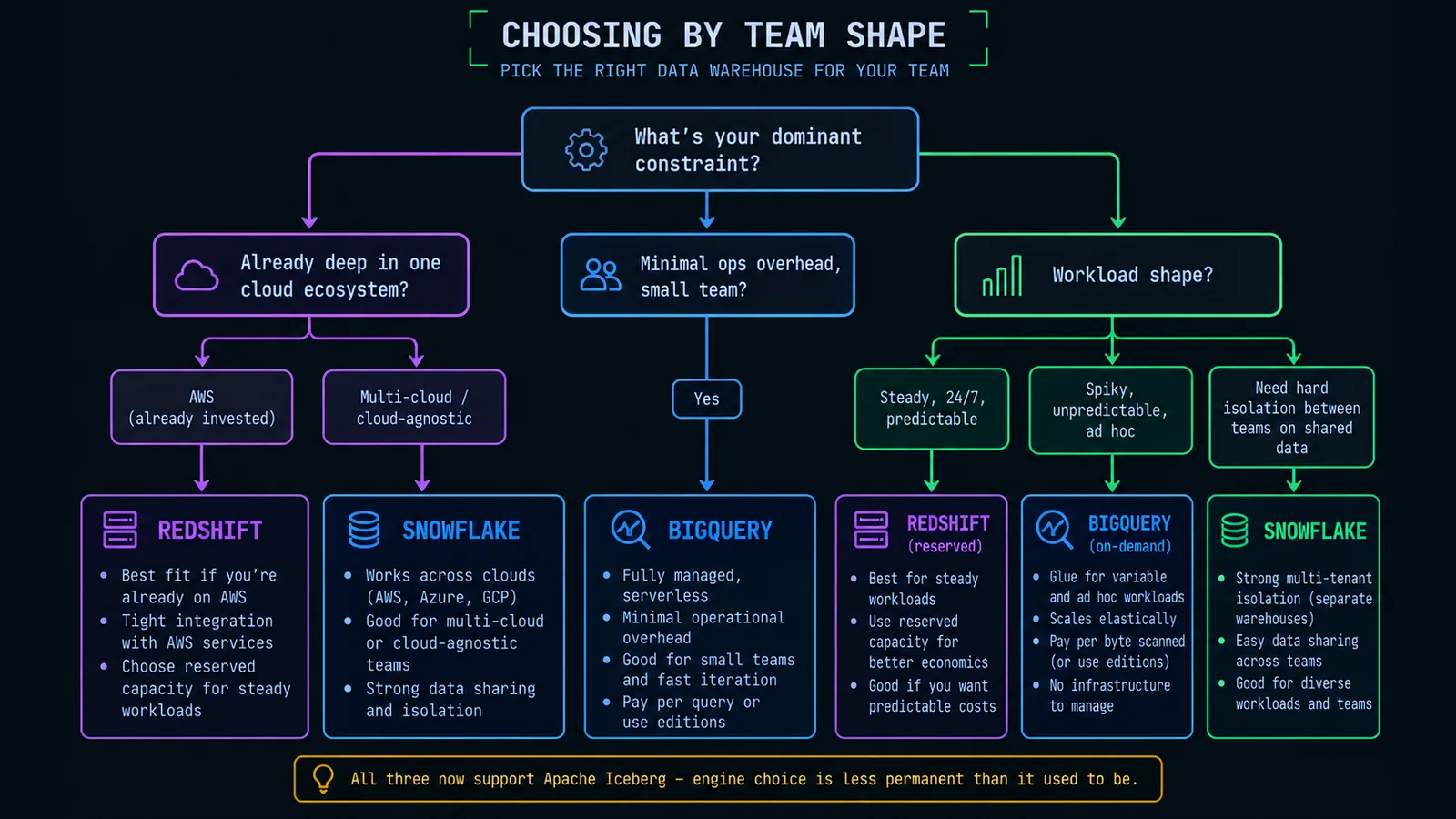
A note on how much weight to put on this table: it's a set of reasonable defaults, not a substitute for actually modeling your own workload against real pricing. Two teams with superficially similar profiles — same headcount, same industry, same rough data volume — can land on different correct answers because one team's query patterns are disciplined and the other's aren't, or because one team already has deep AWS operational knowledge and the other doesn't, or because one organization has a hard policy against hyperscaler lock-in and the other doesn't care. Use the table to narrow to one or two credible candidates, then actually run a proof of concept against your own representative workload and your own team's habits before committing — a two-week pilot that surfaces a bad fit is far cheaper than the multi-month migration described in the previous section.
Wrapping Up
If there's one idea worth carrying out of this entire comparison, it's that "storage and compute are separated" is table stakes in 2026, not a differentiator — every serious cloud warehouse does it now. The actual decision lives one level down, in how each platform implements that separation and, more importantly, in what kind of discipline and operational behavior each pricing model rewards or punishes. Snowflake rewards careful warehouse sizing and suspend discipline and pays it back with the cleanest workload isolation story of the three. BigQuery rewards careful table design and query discipline and pays it back with genuinely zero infrastructure to manage. Redshift rewards genuine capacity planning and reservation discipline and pays it back with the most predictable cost of the three for steady, always-on load, while still offering a serverless on-ramp for teams that don't want that operational commitment yet.
None of that maps cleanly onto "which one is best" — it maps onto "which one fits the team and workload you actually have, not the one you might have in two years." Pick based on your actual cloud footprint, your actual query patterns, your actual team's operational appetite, and — a genuinely underrated factor — how much you trust your own team's discipline around the specific thing each pricing model punishes. Revisit the choice when the workload's shape changes meaningfully, not on a fixed schedule just because a new pricing tier launched. And take real comfort in the fact that Iceberg support across all three has made this decision less permanent than it was even a couple of years ago — it's still a real decision worth taking seriously, just no longer a one-way door the way it used to feel.
— Rakesh
One email, every other week.
New posts on data engineering, applied AI, and the business decisions around them. No noise, unsubscribe anytime.
Comments
All comments are reviewed before they appear publicly — this keeps spam out.
Loading comments…